Well, I'm more than a few miles from home on a business trip, and she calls to say the computer is slowly crashing (BSOD, reboot and lives for a few minutes, then BSOD).
HP Iq504 with 4GB RAM. Hit F9 on boot, and you get a hardware analysis program that loads outside of Windows. Good.
She runs it and says the memory is bad. Not Good.
Newegg.com to the rescue! 2x2GB sticks of ram for $40, and it arrives in four days.
I send her the video and instruction link on the HP website. Basically, with the computer face down on a soft cloth, lift the stand straight up, lock with sliding tab, and unscrew back panel. Release memory chip clips, remove, and reverse for installation. She breezes right through the replacement without any glitches... until.
Until the darned computer stand locking latch won't unlock. She tries for 20 minutes, calls HP, no luck. They tell her to take it to Best Buy... they try, no luck. The latch WON'T BUDGE.
A neighbor finally succeeds in completely disassembling the stand/latch mechanism and there is a HUGE spring in there that is so big the little plastic tab on the latch has no way to push against the spring. He had to use huge pliers (with safety glasses on!) to get the spring to retract enough to unlatch the stand.
Well, all is good. But HP better come up with a better latch, or at least a better way for consumers to trouble shoot this item. Come on... it's just a stand. How hi-tech does it have to be to reliably lock into place?
But, I'm proud of her!
Geek out,
Matt
PS: A shout out to Ed Rice who had volunteered to help her with the memory replacement!
Note on "F" keys at boot for many recent HP laptop/IQ computers: (HP Computers after late 2008)
(F1) System Information
(F2) System Diagnostics
(F7) HP SpareKey
(F8) Window$ boot option
(F9) Boot Device Options
(F10) BIOS Setup
(F11) System Recovery for Consumer Notebooks
(F12) Network Boot
WALL-MOUNTING an IQ touch computer:
Hardware Geeks forum post
www.retrovo.com has the free user's manuals and supplemental manuals for troubleshooting performance problems, recovery, etc., if you've lost the originals.
Wednesday, August 12, 2009
Monday, August 3, 2009
PS3 and cheap wireless setup guide
I wanted to setup the PS3 to its wireless potential, as the house here in Okinawa has no LAN cables anywhere... the house was built only 3 years ago, and in Japan. You'd a thunk it had LAN pre-wire???!!!???
1. PS3 off, plug in USB adapter
2. Power on PS3
3. Menus on PS3: Setting --> Network Settings --> Internet Connections
4. Select "yes" to disconnect from whatever old way you may have had been connected.
5. Select "Easy"
6. Select "Wireless"
7. Scan ... you'll see your aptly named wireless router, amongst all your neighbors (with weaker signals, usually)
8. Select your SSID (wireless name)
9. Security Settings "WEP" (if that is what you have, you may have an "N" router setup for "WPA")
10. Enter your security key... mine is 65-bit, so ten hex numbers, enter with the handpiece, hit ENTER or "start" button
11. Save settings and test.
Of course, I went with the option for "manual" entry, not "easy". You can tweak for a custom DNS, static IP address from the router, MTU (mine is 1454 here in Okinawa over my PPPoE connection). You can also enter the IP of the router (192.168.0.1 for D=Link routers).
Lots of nice tweaks. I use OpenDNS servers: 227.68.222.222 and .220.220 nice and fast, with filtering capability for everything on the network.
Geek out!
Matt
Sony's website on this topic:
CLICK HERE
1. PS3 off, plug in USB adapter
2. Power on PS3
3. Menus on PS3: Setting --> Network Settings --> Internet Connections
4. Select "yes" to disconnect from whatever old way you may have had been connected.
5. Select "Easy"
6. Select "Wireless"
7. Scan ... you'll see your aptly named wireless router, amongst all your neighbors (with weaker signals, usually)
8. Select your SSID (wireless name)
9. Security Settings "WEP" (if that is what you have, you may have an "N" router setup for "WPA")
10. Enter your security key... mine is 65-bit, so ten hex numbers, enter with the handpiece, hit ENTER or "start" button
11. Save settings and test.
Of course, I went with the option for "manual" entry, not "easy". You can tweak for a custom DNS, static IP address from the router, MTU (mine is 1454 here in Okinawa over my PPPoE connection). You can also enter the IP of the router (192.168.0.1 for D=Link routers).
Lots of nice tweaks. I use OpenDNS servers: 227.68.222.222 and .220.220 nice and fast, with filtering capability for everything on the network.
Geek out!
Matt
Sony's website on this topic:
CLICK HERE

Saturday, August 1, 2009
Speeding Up Internet Access in Japan
I have a pretty fast fiber-optic connection here in Okinawa, Japan. Speed test with local Japanese servers have me anywhere from 11MB/s to 25MB/s. Unfortunately, everything I watch & download is from America, 7000 miles away: things can slow down significantly, especially with the default windows settings, which are for LAN connections.
Testing to USA servers was about 1.5MB/s down & 1.7MB/s up (BTW, this is the fasted upload speeds I've ever seen... posting pics and videos are incredibly fast, about 5-8x faster than what I had in the USA).
YouTube videos were stuttering quite a bit, even on low-res. YouTube has recently been rumored to 'throttle back' download speeds to overseas IP addresses. Fortunately, HULU SD were good, and the HD videos stuttered occasionally for buffering.
So, I did some "tweaking" of my TCP/IP stack and DNS. All diagnostic tools were from www.dslreports.com
Here's my tweaks:
MTU of 1454 (I have a PPPoE connection, and did the testing to make sure this was the max before packet errors surfaced, using MTUTEST.EXE)
TCP Receive Window: 260176
Windows scaling YES
Time Stamping NO
Selective Acks YES
Path MTU Discovery YES
Black Hole Detection NO
Max. Duplicate ACKs 2
TTL 64
(Testing and tweaking with DRTCP021.exe)
Increased max connection to 10 with M$ FixIt and/or Tweak-XP Pro IV
Then I opened up the router programming page, and made the DNS default to the OpenDNS servers: 208.67.222.222 & 208.67.220.220
Now YouTube videos don't stutter any longer, and dslreport download speeds from USA servers have increased by double to 3.3MB/s down & 1.7 MB/s up.
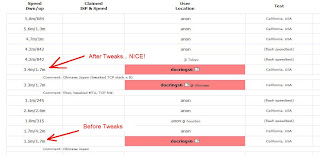
Japan Server Speed Test (Tokyo):
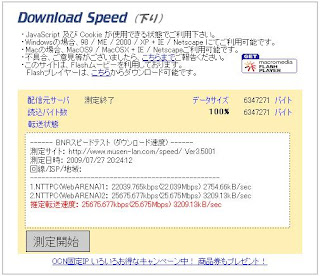
Geek out,
Matt
keywords: tweak internet connection okinawa japan international TCP/IP MTU
Testing to USA servers was about 1.5MB/s down & 1.7MB/s up (BTW, this is the fasted upload speeds I've ever seen... posting pics and videos are incredibly fast, about 5-8x faster than what I had in the USA).
YouTube videos were stuttering quite a bit, even on low-res. YouTube has recently been rumored to 'throttle back' download speeds to overseas IP addresses. Fortunately, HULU SD were good, and the HD videos stuttered occasionally for buffering.
So, I did some "tweaking" of my TCP/IP stack and DNS. All diagnostic tools were from www.dslreports.com
Here's my tweaks:
MTU of 1454 (I have a PPPoE connection, and did the testing to make sure this was the max before packet errors surfaced, using MTUTEST.EXE)
TCP Receive Window: 260176
Windows scaling YES
Time Stamping NO
Selective Acks YES
Path MTU Discovery YES
Black Hole Detection NO
Max. Duplicate ACKs 2
TTL 64
(Testing and tweaking with DRTCP021.exe)
Increased max connection to 10 with M$ FixIt and/or Tweak-XP Pro IV
Then I opened up the router programming page, and made the DNS default to the OpenDNS servers: 208.67.222.222 & 208.67.220.220
Now YouTube videos don't stutter any longer, and dslreport download speeds from USA servers have increased by double to 3.3MB/s down & 1.7 MB/s up.

Japan Server Speed Test (Tokyo):

Geek out,
Matt
keywords: tweak internet connection okinawa japan international TCP/IP MTU
Monday, July 27, 2009
Things I love about Japan
Fast fiberoptic internet speeds, and lightning quick to content in Japan:


Things are about "normal" cable speeds when watching YouTube videos, say, back in the United States.. but it does have to go 7000 miles! :)


Things are about "normal" cable speeds when watching YouTube videos, say, back in the United States.. but it does have to go 7000 miles! :)
Things I don't like about Japan
Streaming videos from the USA are blocked:

All the major websites think they're SOOO smart and give me the Japanese version of their website:

Kanji...those little symbols that you can't even sound out... what's it all mean? This is the air conditioning remote control... I feel like a 99-year-old grandma trying to run a VCR... Argh!!!


Kanji...those little symbols that you can't even sound out... what's it all mean? This is the air conditioning remote control... I feel like a 99-year-old grandma trying to run a VCR... Argh!!!

Saturday, July 25, 2009
Augmented Reality programs for iPhone
Overlay of personal Identification (video)
Overlay of stores, views, restaurants (video)
Starting to look a bit more like the 21st century we all were thinking about back in the 1980's....( the iPhone as Star Trek Tricorder, really...)
"Augmented Reality"...you'd better figure out quick what it is, and how it will change how you interact with EVERYTHING: travel, entertainment, shopping, gaming, business...
Geek out,
Matt
Overlay of stores, views, restaurants (video)
Starting to look a bit more like the 21st century we all were thinking about back in the 1980's....( the iPhone as Star Trek Tricorder, really...)
"Augmented Reality"...you'd better figure out quick what it is, and how it will change how you interact with EVERYTHING: travel, entertainment, shopping, gaming, business...
Geek out,
Matt
Cars in Japan we need in America
With rising emphasis on fuel economy, and new fuel efficiency standards from the government, why isn't America allowing more Japanese car models into America? During my stay on Okinawa, Japan, I've seen dozens of great little cars that would make great college cars, commuter cars, and small family cars.
There are a lot of great Japanese models from familiar companies that are sold worldwide, but not in America. Take a look and see what a great selection of neat little, economical cars they sell here. Most get 35+ MPG.
Toyota IQ

Suzuki Splash

Suzuki Alto

Subaru R1

Subaru R2

Nissan Micra Convertible

Mitsubishi i

Mazda Demio

Honda Life

Daihatsu Move

Daihatsu Move Latte

Daihatsu Mira

Daihatsu Mira Gino

Daihatsu Mira Custom

There are a lot of great Japanese models from familiar companies that are sold worldwide, but not in America. Take a look and see what a great selection of neat little, economical cars they sell here. Most get 35+ MPG.
Toyota IQ

Suzuki Splash

Suzuki Alto

Subaru R1

Subaru R2

Nissan Micra Convertible

Mitsubishi i

Mazda Demio

Honda Life

Daihatsu Move

Daihatsu Move Latte

Daihatsu Mira

Daihatsu Mira Gino

Daihatsu Mira Custom

Friday, July 24, 2009
Can't google figure out I want my login page in ENGLISH???
Okay, I get that I've moved to Japan. I get that google's servers are so smart, and they know my IP address is somewhere on Okinawa, Japan. But heaven help that it doesn't know that for the past three years I've logged on using English, and that would be a nice thing to continue doing, thank you very much.
Look at the screen. Could you even guess which Kanji symbols to actually click? Fortunately, I tried to click-by-memory, and after a few bad attempts, got it to look like the same graphical layout I was used to.
Sheesh! Smart is getting it right, stupid is assuming 100% of everyone on Okinawa reads Kanji symbols.
And everytime I do a google.com search, it assumes I want google.co.jp ... WRONG AGAIN GOOGLE. If I gosh-darn type "www.google.com" into the box, I gosh darn want google.com, not google.co.jp!!!! Give me a break!!!!
The only way is to go to igoogle.com, or hope you can read Kanji symbols again to set your preference for google for English only pages, but still everything gets messed up if you delete cookies.
Google... you need to get even smarter!


Look at the screen. Could you even guess which Kanji symbols to actually click? Fortunately, I tried to click-by-memory, and after a few bad attempts, got it to look like the same graphical layout I was used to.
Sheesh! Smart is getting it right, stupid is assuming 100% of everyone on Okinawa reads Kanji symbols.
And everytime I do a google.com search, it assumes I want google.co.jp ... WRONG AGAIN GOOGLE. If I gosh-darn type "www.google.com" into the box, I gosh darn want google.com, not google.co.jp!!!! Give me a break!!!!
The only way is to go to igoogle.com, or hope you can read Kanji symbols again to set your preference for google for English only pages, but still everything gets messed up if you delete cookies.
Google... you need to get even smarter!


Wednesday, May 13, 2009
Sunday, April 5, 2009
Kill-a-watt meter
I installed a Kill-o-watt meter in my home theater probably a year or more ago, and just now read the meter while pulling all the gear out for our move.
The readings were:
1094 hours time
71.03 kwh total used.
That doesn't seem to compute for the year I had it in, but more than likely it resets whenever the power fails, which happens from time to time down here in Florida.
So, in the past 1094 hours (or 45 days) I used about $7.00 of electricity, or about $5 a month for a 61" LED RPTV Samsung (HLT model), PS3, Xbox 360, Harmon-Kardon HK635 amplifier and a monster power conditioner. Not bad price for the electricity, really, and I would have guessed higher. But it is only used really for movies, and not used as frequently as the family room plasma which is powered on more frequently.
Geek-out,
Matt
The readings were:
1094 hours time
71.03 kwh total used.
That doesn't seem to compute for the year I had it in, but more than likely it resets whenever the power fails, which happens from time to time down here in Florida.
So, in the past 1094 hours (or 45 days) I used about $7.00 of electricity, or about $5 a month for a 61" LED RPTV Samsung (HLT model), PS3, Xbox 360, Harmon-Kardon HK635 amplifier and a monster power conditioner. Not bad price for the electricity, really, and I would have guessed higher. But it is only used really for movies, and not used as frequently as the family room plasma which is powered on more frequently.
Geek-out,
Matt
Wednesday, March 18, 2009
Okay, we have a stainless steel Dacor ventilation hood, and of course, they chose a halogen light bulb that is not carried by anyone on the planet!
The Dacor hoods also require this specialized "suction cup" device to grab the bulb and unscrew it (there is no way to get your fingers around the recessed bulb).
So go to Wal-Mart and buy a pack of cheap suction cups, plop one on the burnt out bulb face, and use a pair of pliers to unscrew the lightbulb.
Now, REMOVE THE TRIM RING to make the opening a little bit bigger and allow a standard halogen bulb from Lowe's to fit in there. I like the GE Halogen 60 Flood, #47578, for about $7.00. Fits like a charm without the trim ring. Seriously, no one will ever miss the trim ring as it is way up under the hood.
Oh, and that suction cup removal tool is supposed to come with every Dacor hood, but I'm sure every suction cup packaged was thrown away by the installer 'dude' along with all the packing materials and the box.
But, of course, Dacor would be happy to sell one to you on their website for $1.75... AND $12.00 shipping!!! Seriously, how stupid is that???!!!!
Fortunately, you got know how and my DIY guide to get you by the corporate greed and engineering stupidity that is at Dacor.
Geek out,
Doc


The Dacor hoods also require this specialized "suction cup" device to grab the bulb and unscrew it (there is no way to get your fingers around the recessed bulb).
So go to Wal-Mart and buy a pack of cheap suction cups, plop one on the burnt out bulb face, and use a pair of pliers to unscrew the lightbulb.
Now, REMOVE THE TRIM RING to make the opening a little bit bigger and allow a standard halogen bulb from Lowe's to fit in there. I like the GE Halogen 60 Flood, #47578, for about $7.00. Fits like a charm without the trim ring. Seriously, no one will ever miss the trim ring as it is way up under the hood.
Oh, and that suction cup removal tool is supposed to come with every Dacor hood, but I'm sure every suction cup packaged was thrown away by the installer 'dude' along with all the packing materials and the box.
But, of course, Dacor would be happy to sell one to you on their website for $1.75... AND $12.00 shipping!!! Seriously, how stupid is that???!!!!
Fortunately, you got know how and my DIY guide to get you by the corporate greed and engineering stupidity that is at Dacor.
Geek out,
Doc


Monday, March 2, 2009
Saturday, January 31, 2009
Is Google Search in Firefox under attack?
Today, all my google searches in Firefox, no matter the subject, have the "This Site May Harm Your Computer" tag, and are unreachable. Even the hotlink to continue shows a "server error" from google. All other search engines are working fine, e.g. Yahoo, etc., and Google search in IE Explorer are fine....
In fact, if I switch Firefox to IE mode (using IE Tab add-on), the search works fine...
What the heck????
Anyone else?
Edit: 10:11AM: Looks like I wasn't the only one.
Digg Stories
Google must have had some BIG problems today, but hopefully, this will get fixed soon.

In fact, if I switch Firefox to IE mode (using IE Tab add-on), the search works fine...
What the heck????
Anyone else?
Edit: 10:11AM: Looks like I wasn't the only one.
Digg Stories
Google must have had some BIG problems today, but hopefully, this will get fixed soon.

Monday, January 12, 2009
Yahoo Pop Email Settings
I can't recall how often I have to set up Yahoo! Email accounts for Outlook Express. I'm just posting the link to make it easy to find for me and everyone else.
/Geek out,
Matt
Tuesday, January 6, 2009
XM Radio customer DIS-service

Well, tonight is "Night Two" of trying to disconnect one of my four XM Radios. The radio died, and now it has been a LOOOOONNNNNNGGGGG time on hold with the customer service reprentatives (yes, plural) to just have one radio turned off.
You can do just about anything on the XM Radio website... except disconnect a radio. No doubt this is just a technological "road block" to try and discourage unhappy customers from being able to cancel their service on a whim ( reminiscent of the now defunct AOL ).
You get through to the first international operator (obviously India) after a hold of about 5 minutes. After an aggravating confirmation of everything but your firstborn, and a pitch for upgrading to Sirius services ("No, Howard Stern is too filthy for me, thank you"), you finally get around to telling them your business of wanting to disconnect just one radio. Well... that's handled by ANOTHER operator in ANOTHER department. When I queried why they must use TWO people to do this, it was because "we're too busy to handle that". What???
And guess, what? I've been able to compose this entire blog post while on hold AGAIN for now
I also have to suffer through Oprah's best friend begging me in a recorded message not to hang up... also a Nascar driver pitching his show and also asking me "this is worth the wait"... NOT!
I want my life back!
Just aggravation, pure and simple. They could easily add a radio button for disconnecting a particular radio (without "canceling" the total subscription). This is just customer harassment and roadblocking, pure and simple.
I love my XM Radio, but the customer service for this particular requirement is a DIS-service. XM... FIX IT!
/Doc
Wednesday, December 31, 2008
Windows Driver Backup
Here's a great website and small batch file program to backup your Windows drivers for a re-install of Windows. Haven't tried it quite yet, but am blogging this for definite future use!
Thursday, November 13, 2008
Free phone, free video phone = skype
I purchased a Logitech camera a few months back pretty cheap after rebate, and now had an opportunity to use it with Skype. The allure of free skype-to-skype video phone calls is alluring, as well as $29.50 a year for unlimited USA skype-to-any landline phone calls. Not bad.
The great thing is that for callling Japan, it is only $9.95 a month, UNLIMITED Skype-to-Japan landline. Wow! How's that for keeping in touch???!!!!
Free download, and just need a cheap webcam: I recommend the Microsoft VX-1000 for $22, a bit more if you have to buy and ship. No need to go too fancy for megapixels, as you want fast streaming/compact video.
Gmail also just announced free video phone/messaging service, too. I will try that later, but I like Skype for the computer-to-landline paid service (but extremely cheap!!!).
Just note that if you are considering ditching your AT&T landline, then you will need a cell phone for 9-1-1 service. Computer phone companies can't reliably give that service, especially if your electricity is out, or your computer just crashed. But for most of us with cell phones, it may be time to ditch the wired phone to the wall, and just go cell/Skype combo.
Geek out,
Matt
The great thing is that for callling Japan, it is only $9.95 a month, UNLIMITED Skype-to-Japan landline. Wow! How's that for keeping in touch???!!!!
Free download, and just need a cheap webcam: I recommend the Microsoft VX-1000 for $22, a bit more if you have to buy and ship. No need to go too fancy for megapixels, as you want fast streaming/compact video.
Gmail also just announced free video phone/messaging service, too. I will try that later, but I like Skype for the computer-to-landline paid service (but extremely cheap!!!).
Just note that if you are considering ditching your AT&T landline, then you will need a cell phone for 9-1-1 service. Computer phone companies can't reliably give that service, especially if your electricity is out, or your computer just crashed. But for most of us with cell phones, it may be time to ditch the wired phone to the wall, and just go cell/Skype combo.
Geek out,
Matt
Saturday, November 1, 2008
Sony Vaio PCV-W600G upgrade
The old 160GB hard drive was getting pretty full, especially with the purchase a year ago of an 8 megapixel camera with video, so Newegg supplied a 500GB hard drive for a pretty good price.
I also had a spare stick of 512MB DDR RAM, so wanted to put that in, too, to bump up the RAM to 768MB (from 256x2, or base 512MB).
Things were pretty straight forward, and both a hard drive change and memory upgrade require no more than a philips head screwdriver.

Step one is to look behind the screen and see a small button, which you depress and then slide the cover to the right an inch, and then lift out (as above).
 Step two involves removing the one small screw over the small plate covering the RAM chips. Then slide the small metal panel and remove. Unsnap the memory release tabs, and insert new RAM (the Vaio motherboard can only support 2 sticks of 512MB DDR-333 SDRAM (desktop RAM, not laptop style). This is also known as PC-2700 as well (speed rating ~ 8 x 333MHz)
Now, time for a Hard Drive upgrade. You better have copied over EVERYTHING you will need to an external USB drive. Think about everything in "My Documents" (incl music, pictures, downloads, etc.). One thing easy to forget is Outlook Email and the Address Book, which is not routinely kept in My Documents, so you will need to export or backup Outlook or Outlook Express email & address book. Do a GOOGLE search on that topic...there are programs out there to do that too. Also think about stuff that is saved under the "Program Files" directory: tax returns, etc.
Consider if you have the restoration disks for your computer, or the ability to re-install Windows (CD + registration key, on the side of the computer). Also consider if there is some program you are using regularly, that you might not have the install disk... this is easy to overlook, and can be a deal-stopper.
The Vaio PCV-W600G originally came with Windows Home version, but I upgraded to WinXP PRO, which can be bought pretty cheap these days.
You're just better off copying the whole darn hard-drive to the USB hard drive (I like to have a backup hard-drive at least double the size of the computer it's backing up...)
Alright, to get the old hard-drive out, remove all the screws you can see holding on the back plastic panel. You will also need to remove two thin rubber "feet" off the bottom to remove two additional screws. Then using a thin screwdriver pop off the plastic cover.
 Then, you will see the metal box holding the hard-drive on the back of the base unit. Remove those screws to the metal "box", and then remove the hard-drive cables for data and power, remove the mounting screws holding the hard-drive to the box, and slide it out.
 Remove the old hard-drive.

Re-install the new hard-drive, and reverse the above to reattach everything to normal. Make sure you get your can of compressed air and blow out the years of accumulated dust, both back here and on any other air intake ports.
Voila! You've upgraded the hard-drive!
If you need to get into the BIOS for any reason, hit F2 a few times immediately after powering up the computer.
You will need your Restoration disk or WinXP install disk in the CD-ROM for the computer to boot and begin the process.
Once Windows is back up and running, let Windows go through the whole "update" process, which can take multiple downloads and re-boots, including SP3, which is humungous. Do *all* updates before installing ANYTHING else. When there are no more updates (go to updates.windows.com to make sure), then save a Restore Point and name it "fresh install with updates" or some-such.
Now copy over all your My Documents folders (pics, music) from the external hard-drive. Reinstall your favorite Programs, and restore your Outlook Express emails (or Microsoft Office to get Outlook going).
Some great programs I always put on a fresh install:
All of these are free shareware, except for those marked with a *
Windows Defender antispyware
Avast antivirus
Firefox 3
Winrar
Outlook Backup program
Picassa3
Framework .Net 3.0 with SP1 (required by many programs)
TweakXP Pro
Winamp 2.95 (fast and fluff free)
Yahoo Widgets
Cobian Backup
Roboform *
Microsoft Mesh (for networking my computers worldwide)
Powertoys
Tweak UI
MS Office * (also get Office Updates from microsoft.com)
CD Burner XP Pro
Audiograbber
Foxit PDF (see PDF files without the large Adobe download)
Printer Drivers
Image Resizer (microsoft free download)
Here's my favorite Firefox add-ons, too, which need to be re-installed:
forecastfox
IE Tab
AdBlock+
AI Roboform
Del.ico.us
Download Statusbar
Tab Effect
Consider moving your email cache and address book to a folder in "My Documents" called "My Email"... that way it gets backed-up automatically when you make a weekly backup of "My Documents" to an external hard-drive (I use Cobian Backup, which is free and reliable).
Have fun,
Geek out,
Matt
I also had a spare stick of 512MB DDR RAM, so wanted to put that in, too, to bump up the RAM to 768MB (from 256x2, or base 512MB).
Things were pretty straight forward, and both a hard drive change and memory upgrade require no more than a philips head screwdriver.

Step one is to look behind the screen and see a small button, which you depress and then slide the cover to the right an inch, and then lift out (as above).
 Step two involves removing the one small screw over the small plate covering the RAM chips. Then slide the small metal panel and remove. Unsnap the memory release tabs, and insert new RAM (the Vaio motherboard can only support 2 sticks of 512MB DDR-333 SDRAM (desktop RAM, not laptop style). This is also known as PC-2700 as well (speed rating ~ 8 x 333MHz)
Now, time for a Hard Drive upgrade. You better have copied over EVERYTHING you will need to an external USB drive. Think about everything in "My Documents" (incl music, pictures, downloads, etc.). One thing easy to forget is Outlook Email and the Address Book, which is not routinely kept in My Documents, so you will need to export or backup Outlook or Outlook Express email & address book. Do a GOOGLE search on that topic...there are programs out there to do that too. Also think about stuff that is saved under the "Program Files" directory: tax returns, etc.
Consider if you have the restoration disks for your computer, or the ability to re-install Windows (CD + registration key, on the side of the computer). Also consider if there is some program you are using regularly, that you might not have the install disk... this is easy to overlook, and can be a deal-stopper.
The Vaio PCV-W600G originally came with Windows Home version, but I upgraded to WinXP PRO, which can be bought pretty cheap these days.
You're just better off copying the whole darn hard-drive to the USB hard drive (I like to have a backup hard-drive at least double the size of the computer it's backing up...)
Alright, to get the old hard-drive out, remove all the screws you can see holding on the back plastic panel. You will also need to remove two thin rubber "feet" off the bottom to remove two additional screws. Then using a thin screwdriver pop off the plastic cover.
 Then, you will see the metal box holding the hard-drive on the back of the base unit. Remove those screws to the metal "box", and then remove the hard-drive cables for data and power, remove the mounting screws holding the hard-drive to the box, and slide it out.
 Remove the old hard-drive.
Re-install the new hard-drive, and reverse the above to reattach everything to normal. Make sure you get your can of compressed air and blow out the years of accumulated dust, both back here and on any other air intake ports.
Voila! You've upgraded the hard-drive!
If you need to get into the BIOS for any reason, hit F2 a few times immediately after powering up the computer.
You will need your Restoration disk or WinXP install disk in the CD-ROM for the computer to boot and begin the process.
Once Windows is back up and running, let Windows go through the whole "update" process, which can take multiple downloads and re-boots, including SP3, which is humungous. Do *all* updates before installing ANYTHING else. When there are no more updates (go to updates.windows.com to make sure), then save a Restore Point and name it "fresh install with updates" or some-such.
Now copy over all your My Documents folders (pics, music) from the external hard-drive. Reinstall your favorite Programs, and restore your Outlook Express emails (or Microsoft Office to get Outlook going).
Some great programs I always put on a fresh install:
All of these are free shareware, except for those marked with a *
Windows Defender antispyware
Avast antivirus
Firefox 3
Winrar
Outlook Backup program
Picassa3
Framework .Net 3.0 with SP1 (required by many programs)
TweakXP Pro
Winamp 2.95 (fast and fluff free)
Yahoo Widgets
Cobian Backup
Roboform *
Microsoft Mesh (for networking my computers worldwide)
Powertoys
Tweak UI
MS Office * (also get Office Updates from microsoft.com)
CD Burner XP Pro
Audiograbber
Foxit PDF (see PDF files without the large Adobe download)
Printer Drivers
Image Resizer (microsoft free download)
Here's my favorite Firefox add-ons, too, which need to be re-installed:
forecastfox
IE Tab
AdBlock+
AI Roboform
Del.ico.us
Download Statusbar
Tab Effect
Consider moving your email cache and address book to a folder in "My Documents" called "My Email"... that way it gets backed-up automatically when you make a weekly backup of "My Documents" to an external hard-drive (I use Cobian Backup, which is free and reliable).
Have fun,
Geek out,
Matt
Tuesday, September 9, 2008
Free eBooks at Project Gutenberg

Here's the Top 100 list, but there are tens of thousands of free eBooks for reading here... You could spend a lifetime and not have to spend another dime on a great book. Here's ALL their books in one listing... it might take a few seconds to download!
Cheap Geek,
Matt
Monday, September 8, 2008
Life Hacks to Simplify Your Life

The blog Zen Habits has some interesting ideas on how to slow down our lives, get more quality with the little time we have. I'm definitely working on the "retire early" plan by saving, saving, saving... Now if I can only get down to five emails a day!
Sunday, September 7, 2008
matthewrings thought you would be interested in this station
 | ||||
 | ||||
 | ||||
 | ||||
| copyright 2008, Pandora Media, Inc. All rights reserved. 360 22nd Street - Suite 440 - Oakland CA - 94612 This is a one-time email sent from A friend, a Pandora listener. Privacy Policy |

Saturday, September 6, 2008
Sennheiser CX300 headphones

These bad boys were just $10 after rebate I found on spoofee.com, from newegg.com. Retail rate is about $50 - $90.
I've been on the look for a decent pair of headphones. While mowing the yard, it's tough to get a pair that stay where you put 'em, and block out the mower noise. I have been using some Pioneer headphones that came with their portable XM Radio: decent sound, but tended to fall out or loosen up with exercise. These Sennheiser headphones come with three different sizes of smooth ear inserts, so a perfect fit was easy to accomplish.
I worked in the yard today for about four hours, and sweat and all, they stayed in the whole time, without the need to figdet them back in occasionally (as my Pioneer earphones loosen up all the time... very annoying). The assymetric cord was about 6" longer than the Pioneer headphones, so there was less tugging/pulling of the cord while the MP3 player was in my front pocket. The CX300's stayed in my ear. Period.
They also sealed out the noise of the mower to a level that you would think there is active noise cancellation, but it's just the superior seal of the earphones. The mower noise was never a bother while jamming out. In fact, I could turn down the volume, as there was almost no mower noise to conceal. That will save my hearing and my batteries.
Sound was clear, bass VERY DEEP for headphones, and non-fatiguing. Fatigue is when you put in a pair of cheap headphones and you just get a headache, and the music never sounds "right"... you just want to rip them out of your head. Not these Sennheisers... NICE and HIGHLY GEEK RATED.
Geek out,
Matt
Thursday, September 4, 2008
Ecomodder website

Do you want to know how to "hypermile"? How about ways to mod your vehicle to get more MPG (and look geeky all at the same time?!)
Then you want to go to www.ecomodder.com and dig into the articles, forums and start logging your own mileage and see if you can attaing the elusive "hypermiler" monicker!
Since trying the tips on the website, I've raised my MPG average from about 22 or 23mpg to around 25 to 28mpg (less if I have to use A/C). Not bad, really, for not having to buy a new car. The EPA estimate is 19mpg combined for the V8 Lexus GS400. I'm a "hypermiler"!!!
Geek out!
Matt
Tuesday, September 2, 2008
Google's Chrome suggested I download something..

...Internet Explorer 8... What???
Talk about "open source"...they don't even care if the first suggestion upon clicking the "suggest site" on their new browser is the Download link to Internet Explorer 8. Kudos, Chrome, kudos!
To be fair, this was probably due to the auto-import feature which Chrome gleaned these "favorites" from IE7 already installed on my machine...
Chrome loads in about 3 seconds, and IE7 took almost 17 seconds to load the first time after reboot... ouch! Firefox took about six seconds, so Chrome wins the fast start award.
Geek out, Google,
Matt
Geeky Hurricane Trackers

Well, with so many cutely-named storms headed to destroy the Gulf Coast lately, it's good to be up-to-date on current storm trackers..
Google has a storm tracker here and I especially like Accuweather's maps and prediction models...which pretty much lets you pick and choose which diverse track makes your wife feel better when she sees it.
Google's Chrome web browser coming today

Google has created their new *much* safer and crash-proof browser, called Chrome.
Here's a fun comic strip detailing all the advantages to Chrome... some of it pretty geeky, but that's what this website is all about.
Bottom line: faster, safer, crash-resistant, personable, more-intuitive, and free is always good!
Geek out,
Matt
Sunday, August 31, 2008

Calculate your carbon footprint...
According to this calculator, my carbon footprint is good-2-go... so I'm completely guilt-free, and no tree-hugger can wave his little finger in my face. Seems like most of my money is going toward paying off my mortgage early, and not buying mountains of carbon-fueled goods and services. So... getting out of debt is really "green" in more ways than one!
For a limited time, I've added the widget to the blog, in the right column.

For a limited time, I've added the widget to the blog, in the right column.

Saturday, August 30, 2008
2000 Lexus GS hood latch DIY
After I was hit in the left fender a year ago, the latch has not really worked well... but it's probably too late to complain now. So... I ordered a new one, and gave the install a go today. Lubed up the underhood cable, too, while I was under there.
Total time about 30 minutes, which also included taking pictures.
Geek out,
Matt
Remember to click to enlarge.


Total time about 30 minutes, which also included taking pictures.
Geek out,
Matt
Remember to click to enlarge.


Subscribe to:
Posts (Atom)