Monday, March 19, 2012
How to backup on ANYTHING, including Windows 7
Great article on the How-to-Geek website on backing up just about anything, on any platform, including Win7, Android, iPhone, Linux, home servers, etc.

Thursday, February 9, 2012
Wednesday, February 8, 2012
Using the Kindle Fire as a Home Automation Touchscreen
$199 Kindle Fire
modded for HomeSeer control of his entire house lighting, HVAC, music, etc.
Click HERE for the story at HomeToys.com
modded for HomeSeer control of his entire house lighting, HVAC, music, etc.
Click HERE for the story at HomeToys.com
Tuesday, February 7, 2012
Mapping Online Cloud Storage to a drive letter..
Gladinet setup procedure in full... use the free version to map virtual drives to the cloud.
Wednesday, January 25, 2012
Tuesday, January 24, 2012


Monday, January 23, 2012
Total Password resource site...
HOW-To-Geek has a great online resource for everything passwords...including recovering when lost or stolen or hihacked...
http://www.blogger.com/img/blank.gif
http://www.blogger.com/img/blank.gif
Tuesday, December 27, 2011
System Restore "Explorer"
Have a single file you want to retrieve from an old Windows restore, without having to restore the entire Windows? Here's a step-by-step:
http://www.howtogeek.com/76212/how-to-mount-a-system-restore-point-to-restore-a-single-file/
http://www.howtogeek.com/76212/how-to-mount-a-system-restore-point-to-restore-a-single-file/
Wednesday, December 21, 2011
Windows Defender, bootable media antivirus
Now you can put Windows Defender Offline beta on a bootable USB stick, CD or DVD. Many viruses and rootkits prevent Windows from booting properly from a hard drive, so a bootable medium with an antivirus is required to clean out the infection.
One advantage of the bootable USB stick, is the program will be able to download new virus definitions directly to the USB stick, as needed, from time-to-time. If you have a USB stick that has "write-protection", enable that, so no virus can get onto the stick once you've written Defender onto it.
Click HERE for the link on how to do this, step-by-step, and mount Windows Defender on a bootable USB thumb-drive or a CD or DVD.
Download the 64-bit or 32-bit version as needed (if you have 64-bit Windows Vista or Windows7) called MSSSTOOLxx.EXE (The Windows download site is HERE)
Run your downloaded executable file, and it will then step through the creation tasks: it will ask what medium you will be installing onto (CD, DVD, thumb drive, etc.)
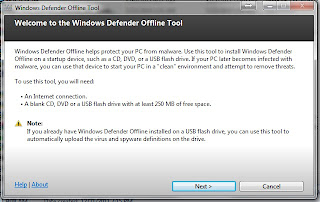
It's next step will be to download the 210MB of files to burn onto the bootable medium. You can also select "ISO", which just downloads the ISO to your current computer, and you can manually copy/burn it to whatever medium you want (advanced users).
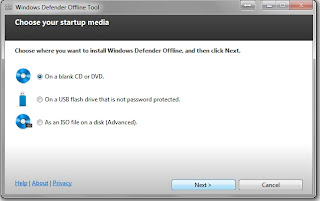
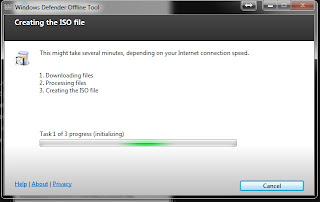
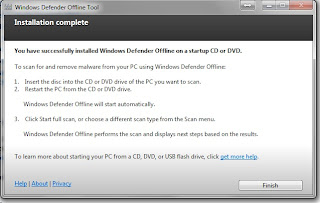
Download took about 10 minutes, even on my fast internet, so just go get a drink and kick back, open up another tab somewhere else on the internet until it's finished. If you have a blank CD or DVD in the drive, and selected that medium, it will automatically burn it for you. Just label it appropriately, and keep it in a safe place. You might want both a 32-bit and 64-bit version for fixing friends' computers which might be one of the two.
If you download the ISO, you can choose a folder for it, and burn it later at your own convenience.
Make sure your thumb drive is not set to have BitLocker encryption...it won't work on those.
There is a program called YUMI which you can install on a USB stick so you can open various ISO boot files, as needed, in case you wanted to put multiple ISO's on one stick.
Windows Defender Offline FAQ is HERE.
Geek Out!
Matt
One advantage of the bootable USB stick, is the program will be able to download new virus definitions directly to the USB stick, as needed, from time-to-time. If you have a USB stick that has "write-protection", enable that, so no virus can get onto the stick once you've written Defender onto it.
Click HERE for the link on how to do this, step-by-step, and mount Windows Defender on a bootable USB thumb-drive or a CD or DVD.
Download the 64-bit or 32-bit version as needed (if you have 64-bit Windows Vista or Windows7) called MSSSTOOLxx.EXE (The Windows download site is HERE)
Run your downloaded executable file, and it will then step through the creation tasks: it will ask what medium you will be installing onto (CD, DVD, thumb drive, etc.)
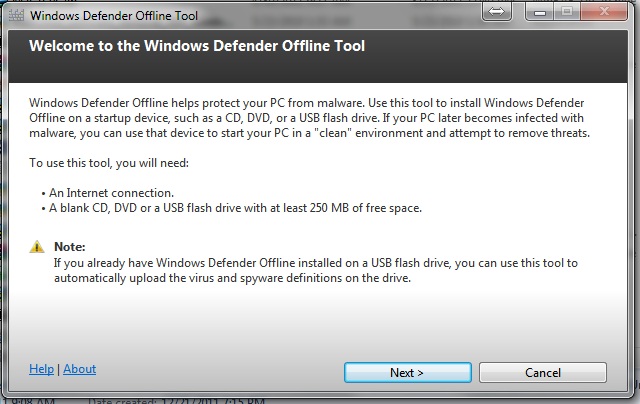
It's next step will be to download the 210MB of files to burn onto the bootable medium. You can also select "ISO", which just downloads the ISO to your current computer, and you can manually copy/burn it to whatever medium you want (advanced users).


Download took about 10 minutes, even on my fast internet, so just go get a drink and kick back, open up another tab somewhere else on the internet until it's finished. If you have a blank CD or DVD in the drive, and selected that medium, it will automatically burn it for you. Just label it appropriately, and keep it in a safe place. You might want both a 32-bit and 64-bit version for fixing friends' computers which might be one of the two.
If you download the ISO, you can choose a folder for it, and burn it later at your own convenience.

Make sure your thumb drive is not set to have BitLocker encryption...it won't work on those.
There is a program called YUMI which you can install on a USB stick so you can open various ISO boot files, as needed, in case you wanted to put multiple ISO's on one stick.
Windows Defender Offline FAQ is HERE.
Geek Out!
Matt
Vista and Win7 ReadyBoost with a USB drive: FAQ
ReadyBoost Overview FAQ LINK
Great overview on ReadyBoost and it's design. Nice point: faster performance, and you can accidentally remove the USB stick at any time without a problem.
Geek out,
Matt
Great overview on ReadyBoost and it's design. Nice point: faster performance, and you can accidentally remove the USB stick at any time without a problem.
Geek out,
Matt
Friday, November 25, 2011
Replace Hard Drive on HP IQ504
Here is the official page to replace the hard drive on the IQ504. Looks like a standard SATA drive.
Sunday, November 13, 2011
Tuesday, November 8, 2011
DIY HDTV antenna, and also CM 4228 HD attic install
A few months back, I got wind from a friend about a DIY HDTV antenna plans. He had bought a $200 HDTV antenna that did squat, and after building this DIY antenna he was getting 20+ digital channels, with most UHF stations about 20 miles South.
Total cost was maybe $20 or so, from Home Depot. (Would have bought from Lowe's, but hey, if they won't interview my wife for a job, then why should I buy from them? Loyalty should go BOTH ways!)
After hooking it up and pointing it just a hair to the Southwest (in the direction of the main city antennas), I got like 30 channels! Woot!
Here's a link to a similar set of plans. Mine are identical, but without the back "reflectors".
http://www.tvantennaplans.com/
I do plan to upgrade to an attic mounted 8-bay Channel Master 4228HD, so as to pull in the more remote PBS stations, and get the ugly thing out of the family room for the WAF, LOL.
Will see if I need a preamplifier or a channel distribution amplifier after sending the signal out to all the bedroom televisions.
EDIT Nov 25, 2011: Installed the Channel Master 4228HD in the attic...and got MUCH better reception vice the DIY unit. Clean installation and I didn't have to make a second DIY unit that doesn't look nearly as nice as the 4228HD. Get like 53 channels now from all over the Atlanta area.

Cheers,
Doc
Total cost was maybe $20 or so, from Home Depot. (Would have bought from Lowe's, but hey, if they won't interview my wife for a job, then why should I buy from them? Loyalty should go BOTH ways!)
After hooking it up and pointing it just a hair to the Southwest (in the direction of the main city antennas), I got like 30 channels! Woot!
Here's a link to a similar set of plans. Mine are identical, but without the back "reflectors".
http://www.tvantennaplans.com/
I do plan to upgrade to an attic mounted 8-bay Channel Master 4228HD, so as to pull in the more remote PBS stations, and get the ugly thing out of the family room for the WAF, LOL.
Will see if I need a preamplifier or a channel distribution amplifier after sending the signal out to all the bedroom televisions.
EDIT Nov 25, 2011: Installed the Channel Master 4228HD
in the attic...and got MUCH better reception vice the DIY unit. Clean installation and I didn't have to make a second DIY unit that doesn't look nearly as nice as the 4228HD. Get like 53 channels now from all over the Atlanta area.
Cheers,
Doc
Wednesday, August 24, 2011
Samsung Color Laser Printer Troubleshooting
Just got back from the Japan move, and when hooking up my Samsung CLP-315W (aka CLP-310), got a big fat red light on the dash panel when booting up.
Checked all the doors for jammed papers, nothing.
I ran the CD-ROM, and installed the Application-->SPanel.exe program, and it said "Waster Toner Cartridge Full".
This website HERE, had details on cleaning it out. Mine wasn't full, but the move must have sloshed enough dry toner powder waste to block the light sensor which detects a full cartridge. Mine was maybe only 20% full, but the powder residue was blocking the light-path sensor, giving me a "FULL" indication, and unit fail-safe shut-down.
After rinsing it all out in the sink (caution: dry powder WILL come out, regardless of all the water you use...it just isn't very water soluble). You might be better off doing it outside under a hose or faucet. Be prepared to wash your hands, and don't touch a thing before you wash with cold water and soap. DON'T use hot water, as that fixes (solidifies) the toner powder, whether that's inside the container or on your clothes. Use cold water to wash your clothes (and don't put any other clothes in the washing machine).
After rinsing it out thoroughly, and drying it, I reinstalled, and the printer is back to full working condition.
Cheers!
Matt
Checked all the doors for jammed papers, nothing.
I ran the CD-ROM, and installed the Application-->SPanel.exe program, and it said "Waster Toner Cartridge Full".
This website HERE, had details on cleaning it out. Mine wasn't full, but the move must have sloshed enough dry toner powder waste to block the light sensor which detects a full cartridge. Mine was maybe only 20% full, but the powder residue was blocking the light-path sensor, giving me a "FULL" indication, and unit fail-safe shut-down.
After rinsing it all out in the sink (caution: dry powder WILL come out, regardless of all the water you use...it just isn't very water soluble). You might be better off doing it outside under a hose or faucet. Be prepared to wash your hands, and don't touch a thing before you wash with cold water and soap. DON'T use hot water, as that fixes (solidifies) the toner powder, whether that's inside the container or on your clothes. Use cold water to wash your clothes (and don't put any other clothes in the washing machine).
After rinsing it out thoroughly, and drying it, I reinstalled, and the printer is back to full working condition.
Cheers!
Matt
Thursday, April 7, 2011
DVD ripping and structure
Good post here on everything you wanted to know about DVD's... which may come in handy for ripping DVD to ISO or VOB files, for backup copies.
DVD-5 is a standard 4.7GB DVD disc...
http://www.blogger.com/img/blank.gif
DVD-5 is a standard 4.7GB DVD disc...
http://www.blogger.com/img/blank.gif
Tuesday, March 22, 2011
Bose blows
(Posted to the Home Theater Review blog)
Bose strategy for maximum profits:
1) Repeat over and over "We're the Best" and advertise, advertise, advertise (better compared to whom? When is the last time you heard Pioneer advertise their A/V receivers on a major radio talk show?)
2) Don't allow your products to share floor space with the competition (to prevent A-B comparisons)
3) Ensure the customers are treated warmly and kindly (who can complain with that?)
4) Slick demo interfaces with easy-to-understand interace (again, the competition could learn from this)
5) Ensure the customer stands within the near-field soundstage for great sound and imaging (never mind that no one sits within 3 feet of all their speakers at home, and the sub will never be heard again in their family rooms without major distortion at volumes required)
6) Pay high fees to the big-box stores to put their gear in the high traffic areas (kaching! Money that goes into marketing, and not hardware materials..but all paid by the consumer)
7) Proprietary cable management and RF remotes that prevent/disuade consumers from using non-Bose amplifiers/EQ's/remotes that might steal market share, or future purchases outside the corporate brand.
Again, Bose should be applauded by any capitalist for their marketing genius and I would probably buy a few shares if it was a publicly traded company. But, by no means should anyone put their consumer gear into the same category as "audiophile" equipment. It's "fair" gear, with "great" ease-of-setup by the Grandpa with lots of money, but no audiophile aspirations, or the middle-class "Joe" who has been sold on Bose by the crazy-great marketing machine that is "Bose".
Cheers,
Doc
PS: I've converted more friends from their "1-2-3-WTF?" or "3-2-1-Is that all?" systems than I can even remember. I then take their next $2000 and buy them excellent separates that blow their mind and still have the WAF.
Bose strategy for maximum profits:
1) Repeat over and over "We're the Best" and advertise, advertise, advertise (better compared to whom? When is the last time you heard Pioneer advertise their A/V receivers on a major radio talk show?)
2) Don't allow your products to share floor space with the competition (to prevent A-B comparisons)
3) Ensure the customers are treated warmly and kindly (who can complain with that?)
4) Slick demo interfaces with easy-to-understand interace (again, the competition could learn from this)
5) Ensure the customer stands within the near-field soundstage for great sound and imaging (never mind that no one sits within 3 feet of all their speakers at home, and the sub will never be heard again in their family rooms without major distortion at volumes required)
6) Pay high fees to the big-box stores to put their gear in the high traffic areas (kaching! Money that goes into marketing, and not hardware materials..but all paid by the consumer)
7) Proprietary cable management and RF remotes that prevent/disuade consumers from using non-Bose amplifiers/EQ's/remotes that might steal market share, or future purchases outside the corporate brand.
Again, Bose should be applauded by any capitalist for their marketing genius and I would probably buy a few shares if it was a publicly traded company. But, by no means should anyone put their consumer gear into the same category as "audiophile" equipment. It's "fair" gear, with "great" ease-of-setup by the Grandpa with lots of money, but no audiophile aspirations, or the middle-class "Joe" who has been sold on Bose by the crazy-great marketing machine that is "Bose".
Cheers,
Doc
PS: I've converted more friends from their "1-2-3-WTF?" or "3-2-1-Is that all?" systems than I can even remember. I then take their next $2000 and buy them excellent separates that blow their mind and still have the WAF.
Wednesday, March 9, 2011
DIY speaker building projects
Parts Express is not only one of my favorite places for inexpensive home theater gear and cables, but has a great selection of DIY speaker kits for those with some woodworking skills and a passion for great sound, while saving a LOT of dough!
Check out the kits HERE
Check out the kits HERE
Sunday, February 20, 2011
Saturday, February 19, 2011
Dell monitor white screen of death
I inherited a Dell 17" monitor with intermittent white screen of death, reproducible on multiple computers (meaning its the LCD monitor, not the computer video chips).
Here are some threads on repair, mostly opening up and resoldering cracked joints or looking for bad capacitors:
http://www.fixya.com/support/t5484787-dell_e151fpb_15_monitor_screen_turns
Here are some threads on repair, mostly opening up and resoldering cracked joints or looking for bad capacitors:
http://www.fixya.com/support/t5484787-dell_e151fpb_15_monitor_screen_turns
Transplanting Okinawa Roses and Cherry Trees
There are a couple cultivars of cherry trees, and a fantastic rose bush here on Okinawa I want to bring to America. Since bringing actual plants is forbidden, I'll have to bring seeds.
Rose seeds:
http://scvrs.homestead.com/hybridizekb1.html
Rose cuttings:
http://scvrs.homestead.com/Cuttings1.html
Cherry Blossom Tree seeds:
http://www.thriftyfun.com/tf98116044.tip.html
http://www.ehow.com/how_7415415_grow-cherry-tree-pit.html
Kwanzan Cherry (Japan cultivar) Prunus Serrulata
http://en.wikipedia.org/wiki/Prunus_serrulata
http://cnre.vt.edu/dendro/dendrology/syllabus/factsheet.cfm?ID=310
Cherry Tree Care:
http://www.helpfulgardener.com/phpBB2/viewtopic.php?t=30098
Most of the Washington, D.C. cherry trees are weeping cherry trees, but also a mix of Kwanzan and Yoshino cherry trees. Kwanzan are deeper pink, and Yoshino bloom white to light pink.
Rose seeds:
http://scvrs.homestead.com/hybridizekb1.html
Rose cuttings:
http://scvrs.homestead.com/Cuttings1.html
Cherry Blossom Tree seeds:
http://www.thriftyfun.com/tf98116044.tip.html
http://www.ehow.com/how_7415415_grow-cherry-tree-pit.html
Kwanzan Cherry (Japan cultivar) Prunus Serrulata
http://en.wikipedia.org/wiki/Prunus_serrulata
http://cnre.vt.edu/dendro/dendrology/syllabus/factsheet.cfm?ID=310
Cherry Tree Care:
http://www.helpfulgardener.com/phpBB2/viewtopic.php?t=30098
Most of the Washington, D.C. cherry trees are weeping cherry trees, but also a mix of Kwanzan and Yoshino cherry trees. Kwanzan are deeper pink, and Yoshino bloom white to light pink.
Tuesday, February 15, 2011
Lexus DIY maintenance links
With the 2000 Lexus GS400 needing some service, I started scrounging the web for some great DIY links:
Club Lexus DIY for 2nd Generation GS
Banana GS DIY site
GS 430/300 service manual (requires IE !)
Maintenance items:
Timing Belt (check service paperwork to make sure it was not done at 200,000)
Water pump
Serpentine Belt
Belt Tensioner
Crank Seal and Cam Gear gaskets replaced at same time
Spark Plugs (Pulstar Iridium (+2% MP) or Denso Iridium SK20R11 (.044" gap)
Antifreeze
VVT-i filter replacement ($5)
Steering rack bushings ($40)
Lower Ball joints ($120) another link here on what parts to get:
101-4959 Lower Ball Joint 1 $54.77
101-4960 Lower Ball Joint 1 $54.77
101-4537 Outer Tie Rod End 1 $17.56
101-4586 Outer Tie Rod End 1 $17.56
Auto tranny fluid change
Differential fluid change
Brake Fluid change
Fuel filter and filter "bag" change: DIY HERE (Under Read Seat...see BananaGS DIY site on pics on how to remove back seat)
Watch out for this when changing fuel filter: stuck float
Cabin Filter Change (homemade HEPA filter mod)
Repair A/C evaporator condensation box leakage
actual dash out project and condensor replacement
Sunroof rattle repair DIY
Wipers down into cowl ("not" snow position which is higher)
Smog sensor hack
Change remote key batteries x 2
Mods:
Read end brace install ($90)
Steering Tensioner tightening
Hood Latch Cable replacement (if still acting unreliably)
NAV hack to allow destination input while moving: HERE
Audio mod (hack NAV radio )
(if doesn't work, use the Nav audio hack below to get to the audio menu):
NAV diagnostics hack
Settings
Settings2
Settings3
When FM button is pressed these adjustments are for adjusting the frequency characteristic of the amplifier.
P1 - This is to set the EQ1 point. This number is from from 000 (default) to 286.
P2 - This is to set the EQ2 point. This number is from from 000 (default) to 176.
L - This is to set the attenuation value (Tel mute) point from 0 to -20db.
When TAPE is pressed these adjustments are for adjusting the speaker level values.
F - Front, values from 0 (default) to -80db
R - Rear, values from 0 (default) to -80db
W - Woofer, values from 0 (default) to -80db
Club Lexus DIY for 2nd Generation GS
Banana GS DIY site
GS 430/300 service manual (requires IE !)
Maintenance items:
Timing Belt (check service paperwork to make sure it was not done at 200,000)
Water pump
Serpentine Belt
Belt Tensioner
Crank Seal and Cam Gear gaskets replaced at same time
Spark Plugs (Pulstar Iridium (+2% MP) or Denso Iridium SK20R11 (.044" gap)
Antifreeze
VVT-i filter replacement ($5)
Steering rack bushings ($40)
Lower Ball joints ($120) another link here on what parts to get:
101-4959 Lower Ball Joint 1 $54.77
101-4960 Lower Ball Joint 1 $54.77
101-4537 Outer Tie Rod End 1 $17.56
101-4586 Outer Tie Rod End 1 $17.56
Auto tranny fluid change
Differential fluid change
Brake Fluid change
Fuel filter and filter "bag" change: DIY HERE (Under Read Seat...see BananaGS DIY site on pics on how to remove back seat)
Watch out for this when changing fuel filter: stuck float
Cabin Filter Change (homemade HEPA filter mod)
Repair A/C evaporator condensation box leakage
actual dash out project and condensor replacement
Sunroof rattle repair DIY
Wipers down into cowl ("not" snow position which is higher)
Smog sensor hack
Change remote key batteries x 2
Mods:
Read end brace install ($90)
Steering Tensioner tightening
Hood Latch Cable replacement (if still acting unreliably)
NAV hack to allow destination input while moving: HERE
Audio mod (hack NAV radio )
(if doesn't work, use the Nav audio hack below to get to the audio menu):
NAV diagnostics hack
Settings
Settings2
Settings3
When FM button is pressed these adjustments are for adjusting the frequency characteristic of the amplifier.
P1 - This is to set the EQ1 point. This number is from from 000 (default) to 286.
P2 - This is to set the EQ2 point. This number is from from 000 (default) to 176.
L - This is to set the attenuation value (Tel mute) point from 0 to -20db.
When TAPE is pressed these adjustments are for adjusting the speaker level values.
F - Front, values from 0 (default) to -80db
R - Rear, values from 0 (default) to -80db
W - Woofer, values from 0 (default) to -80db
Thursday, March 4, 2010
LVW-5005 DVD recorder repair
I bought a Lite-On LVW-5005 DVD recorder off of Okinawa Yard Sales.com for cheap: only $20, and that included the remote. Refurbished units with new DVD-writers go for top dollar on e-Bay. It's hard to get DVD-recorders anymore... very few manufacturers even make them due to increasing cable-tv DVR use, and declining sales. But, for those of us with a satellite dish, it's critical for recording, without having to use bulky, messy VCR tapes. The unit has some nice features, including built-in cable/antenna tuner, component out and ability to play JPEG picture discs, as well as audio compact discs and MP3 music discs.
Well, the thing had it's problems right after I bought it...it only would record to CD-RW's for a week, and not DVD-R or RWs. Then it just fizzled out. It stopped initializing discs of any flavor. With American Idol and "24" in high gear, and the wife working some evenings... this was full panic mode, with marital bliss and my tech reputation on the line.
So, the internet search went into high gear, where I learned that the units were known to be plagued by weak factory DVD-writer lasers, and would poop out after a few hundred hours of burning.
Fortunately, forum users have had luck replacing the DVD+/-RW drives with off-the-shelf DVD writers. The downside is that most of the online information was four or more years old, and the recommended drive list included drives that were no longer available. Most of the best forum help is on http://club.myce.com/f102/ .
I tried a few DVD-writers lying around the parts bin in the house or in unused computer towers, and no joy. I went to the Air Force exchange electronics area (The "Powerzone"), and found the I/O Magic Lightscribe 22x DVD+/-R/RW dual format double layer writer. Model # IDVD22DLS, made by Lite-On (rebrandedIHAP422 DVD writer).
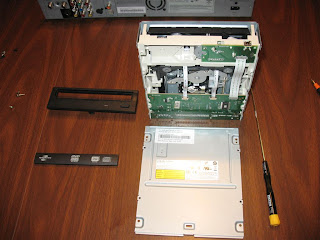
After removing the old drive, I ended up removing the new writer's front face plate, drawer cover, and the bottom metal cover. It rested easily upon the mounting posts of the original case and I ended up gluing it into place. After re-fitting the top case cover, and with the IDE and power cords bolstering it in the rear, it doesn't move when the unit is re-positioned. Some of the forums talk about drilling some holes in the case and zip-tying the replacement drives in more firmly, to avoid any possibility of jostling loose from rough handling of the unit.
Well, time to test the whole she-bang. I slipped in a Memorex CD-R and it didn't work. Bummer. But, I was really only hoping for DVD burning, so I tried some DVD-R disks I had in great supply: Imagine 8x and Maxell 16x's. Both a bust, they were recognized properly as DVD R, but no reliable recording past about one frame of video, and then wouldn't play back.
I had a pack of ten Pengo DVD+RW discs, and Voila!, they initialized and recorded fine. Even a few test timed recordings starter, recorded, and ended without a problem. Whew! Finally, a winner disk. Fortunately, I have a ten pack, (they sell them at the Base Exchanges here on Okinawa). The nice thing about the DVD+RW discs is that after watching the show, you can just erase the disk...so actually no need to replace the disc at all. The LVW-5005 can record in 1hr, 2hr, 4hr or 6hr quality. The 4-hr mode gives an adequate SD quality with stereo, and has quick 16x fast-forward capability with a visible image, so you know when to hit "play".
Hope this helps you repair your own unit, if you found this post through a google search for "broken LVW-5005" or "repair LVW-5005".
Geek out,
Matt




Well, the thing had it's problems right after I bought it...it only would record to CD-RW's for a week, and not DVD-R or RWs. Then it just fizzled out. It stopped initializing discs of any flavor. With American Idol and "24" in high gear, and the wife working some evenings... this was full panic mode, with marital bliss and my tech reputation on the line.
So, the internet search went into high gear, where I learned that the units were known to be plagued by weak factory DVD-writer lasers, and would poop out after a few hundred hours of burning.
Fortunately, forum users have had luck replacing the DVD+/-RW drives with off-the-shelf DVD writers. The downside is that most of the online information was four or more years old, and the recommended drive list included drives that were no longer available. Most of the best forum help is on http://club.myce.com/f102/ .
I tried a few DVD-writers lying around the parts bin in the house or in unused computer towers, and no joy. I went to the Air Force exchange electronics area (The "Powerzone"), and found the I/O Magic Lightscribe 22x DVD+/-R/RW dual format double layer writer. Model # IDVD22DLS, made by Lite-On (rebrandedIHAP422 DVD writer).
After removing the old drive, I ended up removing the new writer's front face plate, drawer cover, and the bottom metal cover. It rested easily upon the mounting posts of the original case and I ended up gluing it into place. After re-fitting the top case cover, and with the IDE and power cords bolstering it in the rear, it doesn't move when the unit is re-positioned. Some of the forums talk about drilling some holes in the case and zip-tying the replacement drives in more firmly, to avoid any possibility of jostling loose from rough handling of the unit.
Well, time to test the whole she-bang. I slipped in a Memorex CD-R and it didn't work. Bummer. But, I was really only hoping for DVD burning, so I tried some DVD-R disks I had in great supply: Imagine 8x and Maxell 16x's. Both a bust, they were recognized properly as DVD R, but no reliable recording past about one frame of video, and then wouldn't play back.
I had a pack of ten Pengo DVD+RW discs, and Voila!, they initialized and recorded fine. Even a few test timed recordings starter, recorded, and ended without a problem. Whew! Finally, a winner disk. Fortunately, I have a ten pack, (they sell them at the Base Exchanges here on Okinawa). The nice thing about the DVD+RW discs is that after watching the show, you can just erase the disk...so actually no need to replace the disc at all. The LVW-5005 can record in 1hr, 2hr, 4hr or 6hr quality. The 4-hr mode gives an adequate SD quality with stereo, and has quick 16x fast-forward capability with a visible image, so you know when to hit "play".
Hope this helps you repair your own unit, if you found this post through a google search for "broken LVW-5005" or "repair LVW-5005".
Geek out,
Matt


Monday, February 22, 2010
Is there a Bloom Box in your future?
Imagine a $3000 box in your backyard or basement, that supplies all the energy for your home for half the cost per kilowatt you are currently paying. That is what Bloom Energy is all about. At the heart of this venture is a scientist who invents technology for NASA missions to Mars, and the units are currently successfully making power for FedEx, eBay, Staples and Google. This could be BIG... I mean REALLY BIG. How about not having to pay an electric bill ever again? Not losing power in an ice storm or after a hurricane? Not having to build more coal-powered energy plants?
Watch CBS News Videos Online
Watch CBS News Videos Online
Wednesday, January 13, 2010
Blu-ray players as Home Theater Set Top Boxes
Read the story here on how your next Blu-Ray player will do just about everything *besides* playing BR discs: stream Pandora music, stream Netflix movies, play pay-per-view movies from Amazon/Vudu/Blockbuster sources, show YouTube videos, display the weather, and just about anything else you can think of...
Cool!
Geek out,
Matt
Cool!
Geek out,
Matt
Friday, January 1, 2010
New HD satellite box for Armed Forces Network (AFN)

I just signed up for the new Hi-Def satellite box, the Cisco 9865:
Cisco Video HERE
There is a Stars-n-Stripes article on it HERE. EDIT: did you catch the little blurb about not going HD until 2012? I doubt you did, either...
I'm on a waiting list, and there is no increased cost for the monthly lease. Looks like it has HDMI and Component video out.
The product manual is HERE on the Cisco website.
No word on whether my current LNB antenna will work, or if the signal gets routed through the same satellite I'm using now. And Dolby Digital Plus may be a software upgrade, and don't know if that is implemented in the current firmware. Surround sound will be via S/PDIF RCA type connector (not optical), which is fine by me, as my only optical input is taken by the PS3, but I have two open S/PDIF inputs on my Pioneer A/V receiver.
I will keep everyone posted when I get my box from the exchange.
Geek Out,
Matt
20 FEB 2010 UPDATE: The new box will **NOT** give a HD signal until 2012, when AFN switches the satellite to an HD signal. The box does have HDMI, but will only upconvert the regular SD picture to 1080 (but still be low-resolution). **Don't get the box** if you don't have to!!!!! The instructions they hand out at the Customer Service Desk do NOT work with setting up the new box for Japan/Korea (AFRTS)... only Guam (DTS Pacific), DTS Atlantic and DTS Indian Ocean areas.
Upside is:
1) upconverts to 1080 over HDMI
2) simultaneously outputs audio and video to your recording device (via composite and stereo out) at the same time as outputting over HDMI
3) Has an EGN (Electronic Guide) with all the channels and their names, from which you can select to change channels without having to input numbers.
NOTE: Right now, the unit will NOT pass through ANT IN signals (say from another video source like a cable box), through TV OUT unless the unit is powered off. Cisco says they will correct this with a future software release. There is no discussion how to upload firmware upgrades to our boxes.
I am going to post instructions in the next few hours on the settings to acquire the AFRTS Japan/Korea satellite with the new box.
Configuration Guide for the D9865 “HD” AFN Satellite Decoder Box:
This is specific for the customers in Japan and Korea including Okinawa
Plug in the unit and all video/audio cables. There is a power switch on the “BACK” of the unit (turn on).
Using the supplied remote control, do the following after hooking up satellite wire and television via cables:
{NOTE: The “preset” in the decoder for AFRTS Korea/Japan has incorrect data and will NOT work}
1) Hit the “MENU” button
2) Using arrow down button, highlight “Setup Menu”, and hit “OK”
3) “Tuning / Preset” should be highlighted, and hit “OK”
4) Using the arrow buttons and OK button to edit the following settings to match:
Modulation Type: DVB-S
Downlink: 12.647 GHz
Symbol Rate: 28 MSps
NetID: 4
LO Select: Auto
LO Freq 1: 9.75 GHz
LO Freq2: 10.6 GHz
Crossover: 11.7 GHz
LNB Power: V-NIT (or) H-NIT [You may need to try one or the other, depending on your antenna]
DisEqC: Disable
DisEqc Switch: Off
5 ) Once you set these up correctly, you should get a “LOCK”
6) On the remote, hit the GREEN button to save
7) The unit should start to automatically “Acquiring Network” and “Acquisition Success”
8) Hit “OK” to save
9) Hit “Exit” to exit the menu
10) You should either get a picture or a message stating that the particular channel requires authorization. It may take up to 24 hours for authorization to be downloaded to the satellite box.
This instruction was compiled by a local Okinawa military officer subscriber, and may have inaccuracies depending upon your satellite dish hardware, and in the event it does not work, you will have to call your satellite installer for more detailed technical help.
** AAFES does not condone nor endorse this instruction, nor responsible for charges for setting up your satellite decoder box by a professional. **
Hit the Blue Button to “ACTIVATE” and follow the prompts, for acquiring the signal.
If you get a signal LOCK, that is what you want, and then Exit.
If you go to the channels and don’t see a picture, it should say something about requiring authentication… that means you are getting the right satellite, and you just need to wait until your decoder box is authenticated back in California. Make sure you have the customer service manager IMMEDIATELY input your new box into the system at the exchange, or they may wait until the end of the shift… and you won’t get authenticated as quickly as needed.
Fun Pic of my Daihatsu Pyzar in Okinawa with Moon Discs:

Tuesday, December 22, 2009
Windows 7 64-bit install
New hard-drive (after old POS Seagate 1.5TB died), so decided to go for the whole enchilda and upgrade from WinXP Pro to Win 7 Home Premium.
Newegg shipped quick, and installing clean to the new hard-drive.
So far:
25 minutes for initial "Installing" screen (it may be black with only an arrow, but let it run! ... Don't reboot!)
15 minutes to recognize all the drives (2 HD, and one Blu-Ray ROM)
40 minutes to format the Disk 0 (new unpartitioned hard drive)
40 minutes - "copying windows files" said "0%" for about 40 minutes, then went on to the next step. I actually thought it had stalled, and was doing some google searches on it ... but then it completed.
30 minutes - Completing Installation
4 hours - Installing software from internet
1 hours - image new hard-drive to backup (with Win7 image program)
10 minutes - make System restore DVD from Win 7
Man, is it fast on my Core 2 Duo 64-bit processor and 4GB ram... WOW!!!!
Software to install:
ASUS P5E-VM HDMI motherboard drivers
Windows Defender antispyware (if not included)
Avast antivirus
Google Chrome
Adobe Flash Player
Firefox 3
Winrar
Picasa 3
Tweak Win 7 Pro
Winamp
Yahoo Widgets
Cobian Backup
Roboform *
Microsoft Mesh (for networking my computers worldwide)
MS Office * (SP1 SP2 SP3)
M$ Live Mail
CD Burner XP Pro
Audiograbber
Zoomplayer Premium
AnyDVD
CloneDVD
Printer Drivers
Image Resizer for Win 7 (64-bit)
ImgBurn
MobiPocket ebook reader
Replay Radio
Skype
Google Earth
Harmony Remote software
QTLite
Games:
Steam Game Client (Half-Life2 and Arma2)
Microsoft FS X
Move Documents, Music and Pictures back to Hard-drive from backup drive.
Here's my favorite Firefox add-ons, too, which need to be re-installed:
Cool Iris
forecastfox
IE Tab
AdBlock +
AI Roboform
Del.ico.us
Download Statusbar
Tab Effect
Consider moving your email cache and address book to a folder in "My Documents" called "My Email" ... that way it gets backed-up automatically when you make a weekly backup of "My Documents" to an external hard-drive ( I use Cobian Backup, which is free and reliable).
Newegg shipped quick, and installing clean to the new hard-drive.
So far:
25 minutes for initial "Installing" screen (it may be black with only an arrow, but let it run! ... Don't reboot!)
15 minutes to recognize all the drives (2 HD, and one Blu-Ray ROM)
40 minutes to format the Disk 0 (new unpartitioned hard drive)
40 minutes - "copying windows files" said "0%" for about 40 minutes, then went on to the next step. I actually thought it had stalled, and was doing some google searches on it ... but then it completed.
30 minutes - Completing Installation
4 hours - Installing software from internet
1 hours - image new hard-drive to backup (with Win7 image program)
10 minutes - make System restore DVD from Win 7
Man, is it fast on my Core 2 Duo 64-bit processor and 4GB ram... WOW!!!!
Software to install:
ASUS P5E-VM HDMI motherboard drivers
Windows Defender antispyware (if not included)
Avast antivirus
Google Chrome
Adobe Flash Player
Firefox 3
Winrar
Picasa 3
Tweak Win 7 Pro
Winamp
Yahoo Widgets
Cobian Backup
Roboform *
Microsoft Mesh (for networking my computers worldwide)
MS Office * (SP1 SP2 SP3)
M$ Live Mail
CD Burner XP Pro
Audiograbber
Zoomplayer Premium
AnyDVD
CloneDVD
Printer Drivers
Image Resizer for Win 7 (64-bit)
ImgBurn
MobiPocket ebook reader
Replay Radio
Skype
Google Earth
Harmony Remote software
QTLite
Games:
Steam Game Client (Half-Life2 and Arma2)
Microsoft FS X
Move Documents, Music and Pictures back to Hard-drive from backup drive.
Here's my favorite Firefox add-ons, too, which need to be re-installed:
Cool Iris
forecastfox
IE Tab
AdBlock +
AI Roboform
Del.ico.us
Download Statusbar
Tab Effect
Consider moving your email cache and address book to a folder in "My Documents" called "My Email" ... that way it gets backed-up automatically when you make a weekly backup of "My Documents" to an external hard-drive ( I use Cobian Backup, which is free and reliable).
Friday, December 18, 2009
Okinawa AFN Satellite Setup
Dish is $149.95 at the Kadena BX electronics section ("Powerzone")
Receiver can be leased from the Kadena BX for about $16/month.
Log on to https://pvconnect.net/ and enter the receiver's TID and UA numbers (from the back of the unit). It can take 24 hours to activate your receiver (mine took about 3 hours). This won't prevent you from tuning the dish, though.
Setup website for AFN
Satellite:
Newskies NSS-6
Satellite: NSS 6 (95.0 E)<-- Need this to choose your dish easily from a list
Elevation: 42.5°
Azimuth (true): 235.4°
Azimuth (magn.): 240.1°
Pointing help Dishpointer website using google maps: HERE NSS-6 is at 95.0E
Here's a video about the iPhone app to help point to the satellites that are out there in space...pretty cool!
Okinawa DTS Pacific Model 9835 Settings
A. On your remote, push the menu button to pull up the main menu on your television screen.
B. Once you are on the main menu, press 2. This will, take you to the Presets/LNB Menu.
C. Once you are on-the Preset/LNB-Menu, this is.the setting you should see (if not change them), if you can't change them all, go to "activate"/"OK", and then it will allow you to change them (move the arrows and hit OK to select, then arrows to change values).
Active: 3
Preset: 3 (Japan Korea)
Downlink: 12.647
Sym Rate: 28.0
FEC Rate: Auto
Polarization: V (vertical) [or] try H (depending on your dish hardware)
Network ID: 4
LO Freq#1: 9.750
LO Freq#2: 10.600
Crossover: 11.700
LO Select: LO2 (If this doesn't work, try Xover)
D. To change your Preset setting to match those above, you-use the arrow keys on your remote to move the highlight bar to the item to be changed. Push the OK button on the remote to clear the field, input the correct numbers using the remote, then push select again to lock the new information into the decoder.
E. Once all settings are correct, highlight the "Activate" function at the bottom of the screen and push the OK button.
F. Once the activation is completed,
G. Select "3. Dish Setup" to get a tone to aim the dish. Beeping is no signal, steady is better, with peak signal values/tone.
Any problems call AFRTS March ARB, CA
DSN: 312-348-1339
Comm: 951-413-2339
24/7 service provided
If you-are looking for information on the service provided (number of channels available, satellite dish setup, etc.) use the website listed below. http://myafn.net
Receiver can be leased from the Kadena BX for about $16/month.
Log on to https://pvconnect.net/ and enter the receiver's TID and UA numbers (from the back of the unit). It can take 24 hours to activate your receiver (mine took about 3 hours). This won't prevent you from tuning the dish, though.
Setup website for AFN
Satellite:
Newskies NSS-6
Satellite: NSS 6 (95.0 E)<-- Need this to choose your dish easily from a list
Elevation: 42.5°
Azimuth (true): 235.4°
Azimuth (magn.): 240.1°
Pointing help Dishpointer website using google maps: HERE NSS-6 is at 95.0E
Here's a video about the iPhone app to help point to the satellites that are out there in space...pretty cool!
Okinawa DTS Pacific Model 9835 Settings
A. On your remote, push the menu button to pull up the main menu on your television screen.
B. Once you are on the main menu, press 2. This will, take you to the Presets/LNB Menu.
C. Once you are on-the Preset/LNB-Menu, this is.the setting you should see (if not change them), if you can't change them all, go to "activate"/"OK", and then it will allow you to change them (move the arrows and hit OK to select, then arrows to change values).
Active: 3
Preset: 3 (Japan Korea)
Downlink: 12.647
Sym Rate: 28.0
FEC Rate: Auto
Polarization: V (vertical) [or] try H (depending on your dish hardware)
Network ID: 4
LO Freq#1: 9.750
LO Freq#2: 10.600
Crossover: 11.700
LO Select: LO2 (If this doesn't work, try Xover)
D. To change your Preset setting to match those above, you-use the arrow keys on your remote to move the highlight bar to the item to be changed. Push the OK button on the remote to clear the field, input the correct numbers using the remote, then push select again to lock the new information into the decoder.
E. Once all settings are correct, highlight the "Activate" function at the bottom of the screen and push the OK button.
F. Once the activation is completed,
G. Select "3. Dish Setup" to get a tone to aim the dish. Beeping is no signal, steady is better, with peak signal values/tone.
Any problems call AFRTS March ARB, CA
DSN: 312-348-1339
Comm: 951-413-2339
24/7 service provided
If you-are looking for information on the service provided (number of channels available, satellite dish setup, etc.) use the website listed below. http://myafn.net
Thursday, December 17, 2009
DVD player "burn-in"... I can help!
Click here for my "tongue-in-cheek" response to someone serious about whether DVD players need to be "burned-in" for the best sound and video... shees. A sucker is born every minute, and I jump in with both feet.
Enjoy!
Enjoy!
Saturday, December 12, 2009
Backing up Windows Live Mail
I have moved from Outlook Express 6 to Windows Live Mail. It handles our two email addresses better, giving each email address it's own inbox. Pretty cool, and looks nice, too.
Here's the down-low on backing up the email accounts ("export") to an external hard-drive. Click HERE.
Here's the down-low on backing up the email accounts ("export") to an external hard-drive. Click HERE.
Monday, December 7, 2009
Small stuff.
USB power touchscreen: nice!
Smallest PC in the world
13oz Windows 7 computer, 13 watts. Wow.
Now just combine these two with a wireless keyboard and you've got possibilities. Or put the PC behind a 1080p monitor as an HTPC, with networking to movies on HD or streaming netflix. Or put the computer and monitor in your car with USB 3G... possiblities are endless.
Geek out.
Smallest PC in the world
13oz Windows 7 computer, 13 watts. Wow.
Now just combine these two with a wireless keyboard and you've got possibilities. Or put the PC behind a 1080p monitor as an HTPC, with networking to movies on HD or streaming netflix. Or put the computer and monitor in your car with USB 3G... possiblities are endless.
Geek out.
Friday, December 4, 2009
8800GTS has died
My 18 month-old MSI 8800GTS 320MB OC has started to go on the fritz. It's been intermittent blanking out for 5 to 30 seconds or more (needing reboot). Neither DVI out channel works correctly, and the cable is good (it's working fine with the motherboard video out).
Even putting the fan to 100% and taking off the top of the case with a cold fan has no effect... it's not really hot on the GPU board, and the exhaust is not hot. In fact, the temps are only around 50C or so.
So, I filled out the RMA tech help page on the MSI website... and we'll see how good they are at honoring the 3 year warranty. Hopefully "shipping and handling" will be reasonable. I don't think they will ship to my FPO AP PO Box, so will have to have it shipped to family, and have them send it on...
Fingers crossed,
Geek out.
UPDATE: MSI approved an RMA. They don't ship to PO Boxes (like my overseas military address), so I'll have the repaired unit shipped to a family member, and have them ship it over. Updates to follow.
Even putting the fan to 100% and taking off the top of the case with a cold fan has no effect... it's not really hot on the GPU board, and the exhaust is not hot. In fact, the temps are only around 50C or so.
So, I filled out the RMA tech help page on the MSI website... and we'll see how good they are at honoring the 3 year warranty. Hopefully "shipping and handling" will be reasonable. I don't think they will ship to my FPO AP PO Box, so will have to have it shipped to family, and have them send it on...
Fingers crossed,
Geek out.
UPDATE: MSI approved an RMA. They don't ship to PO Boxes (like my overseas military address), so I'll have the repaired unit shipped to a family member, and have them ship it over. Updates to follow.
Wednesday, October 28, 2009
XBOX 360 wireless hack
Don't want to spend a ridiculous $100 on a simple wireless connector for your XBOX? (Shees, an entire XBOX can be bought for $199!)
Anyway, find an old router laying around and load a Linux hack onto it's BIOS, and create a wireless bridge from this hacked router to your wireless internet router.
Used routers are about $20 or less...
http://www.cellfanatic.com/2008/01/13/router-dd-wrt-low-cost-xbox-360-wireless
http://www.geeksaresexy.net/2007/10/02/how-to-cheap-wireless-for-your-xbox-360/
http://www.dd-wrt.com/wiki/index.php/Main_Page
Geek out,
Matt
Anyway, find an old router laying around and load a Linux hack onto it's BIOS, and create a wireless bridge from this hacked router to your wireless internet router.
Used routers are about $20 or less...
http://www.cellfanatic.com/2008/01/13/router-dd-wrt-low-cost-xbox-360-wireless
http://www.geeksaresexy.net/2007/10/02/how-to-cheap-wireless-for-your-xbox-360/
http://www.dd-wrt.com/wiki/index.php/Main_Page
Geek out,
Matt
Tuesday, October 13, 2009
Thursday, September 24, 2009
Links to every browser out there...
Nice links to all the different browsers in one place:
* Access Browser: Download
* America Online 9.0, 9.0 Security Edition: Download
* Avant Browser 9.x/10: Download
* FireFox 1.5/2.0/3.0 Beta: Download
* Internet Explorer 6/7: Download
* Maxthon 1.1: Download
* NeoPlanet 5.2: Download
* Netscape 8.x/9.0 Beta: Download
* Mozilla 5.2: Download
* Opera 9.0 (Not Opera 8): Download
* Safari 3.0 for Windows: Download
Thanks to: http://www.crcbermuda.com/site-docs/browser-compatibility
* Access Browser: Download
* America Online 9.0, 9.0 Security Edition: Download
* Avant Browser 9.x/10: Download
* FireFox 1.5/2.0/3.0 Beta: Download
* Internet Explorer 6/7: Download
* Maxthon 1.1: Download
* NeoPlanet 5.2: Download
* Netscape 8.x/9.0 Beta: Download
* Mozilla 5.2: Download
* Opera 9.0 (Not Opera 8): Download
* Safari 3.0 for Windows: Download
Thanks to: http://www.crcbermuda.com/site-docs/browser-compatibility
How to view USA video content while overseas...

Since getting to Japan, I've gotten so sick and tired that Google and amazon and a host of other oh, so smart websites think it's pretty cool to assume I read Kanji since my IP address is in Asia. I can't use my browser's Google search bar, because when I type in a search it searches for Asian content, and displays it in Japanese. Yes, I can save the preference for English for the web-page Google, but not the search bar box. Yuk. No, the web is not "smart", just as dumb as the programmers want to be.
Sure, this works for the locals over here, but there is a VERY LARGE group of overseas Americans, both military and civilian business persons, that this seriously impedes any decent, productive web-browsing. Or drives us to use other provider's search engines that don't have this behavior: I was using Searchalot for my default search bar engine.
To top it off the frustration, I have subscriptions to Netflix that I can't watch due to the fact I am outside the USA. By golly, I've paid for it, I'm a US citizen on "extended vacation", and I want my video!
Well, I've found the solution to access my subscriptions, and get Google and the gang to think I am back where I belong: back in America.
It's a free software program called Hotspot Shield, distributed by anchorfree.com
It's paid for by subscription, and creates a virtual VPN back to a stateside IP address. Voila! Back the US of A! Woo Hoo!
Netflix streams once again.
Google is in English!
Tuesday, September 15, 2009
Wednesday, August 12, 2009
Proud of my Wife! The Secret Geek...
Well, I'm more than a few miles from home on a business trip, and she calls to say the computer is slowly crashing (BSOD, reboot and lives for a few minutes, then BSOD).
HP Iq504 with 4GB RAM. Hit F9 on boot, and you get a hardware analysis program that loads outside of Windows. Good.
She runs it and says the memory is bad. Not Good.
Newegg.com to the rescue! 2x2GB sticks of ram for $40, and it arrives in four days.
I send her the video and instruction link on the HP website. Basically, with the computer face down on a soft cloth, lift the stand straight up, lock with sliding tab, and unscrew back panel. Release memory chip clips, remove, and reverse for installation. She breezes right through the replacement without any glitches... until.
Until the darned computer stand locking latch won't unlock. She tries for 20 minutes, calls HP, no luck. They tell her to take it to Best Buy... they try, no luck. The latch WON'T BUDGE.
A neighbor finally succeeds in completely disassembling the stand/latch mechanism and there is a HUGE spring in there that is so big the little plastic tab on the latch has no way to push against the spring. He had to use huge pliers (with safety glasses on!) to get the spring to retract enough to unlatch the stand.
Well, all is good. But HP better come up with a better latch, or at least a better way for consumers to trouble shoot this item. Come on... it's just a stand. How hi-tech does it have to be to reliably lock into place?
But, I'm proud of her!
Geek out,
Matt
PS: A shout out to Ed Rice who had volunteered to help her with the memory replacement!
Note on "F" keys at boot for many recent HP laptop/IQ computers: (HP Computers after late 2008)
(F1) System Information
(F2) System Diagnostics
(F7) HP SpareKey
(F8) Window$ boot option
(F9) Boot Device Options
(F10) BIOS Setup
(F11) System Recovery for Consumer Notebooks
(F12) Network Boot
WALL-MOUNTING an IQ touch computer:
Hardware Geeks forum post
www.retrovo.com has the free user's manuals and supplemental manuals for troubleshooting performance problems, recovery, etc., if you've lost the originals.
HP Iq504 with 4GB RAM. Hit F9 on boot, and you get a hardware analysis program that loads outside of Windows. Good.
She runs it and says the memory is bad. Not Good.
Newegg.com to the rescue! 2x2GB sticks of ram for $40, and it arrives in four days.
I send her the video and instruction link on the HP website. Basically, with the computer face down on a soft cloth, lift the stand straight up, lock with sliding tab, and unscrew back panel. Release memory chip clips, remove, and reverse for installation. She breezes right through the replacement without any glitches... until.
Until the darned computer stand locking latch won't unlock. She tries for 20 minutes, calls HP, no luck. They tell her to take it to Best Buy... they try, no luck. The latch WON'T BUDGE.
A neighbor finally succeeds in completely disassembling the stand/latch mechanism and there is a HUGE spring in there that is so big the little plastic tab on the latch has no way to push against the spring. He had to use huge pliers (with safety glasses on!) to get the spring to retract enough to unlatch the stand.
Well, all is good. But HP better come up with a better latch, or at least a better way for consumers to trouble shoot this item. Come on... it's just a stand. How hi-tech does it have to be to reliably lock into place?
But, I'm proud of her!
Geek out,
Matt
PS: A shout out to Ed Rice who had volunteered to help her with the memory replacement!
Note on "F" keys at boot for many recent HP laptop/IQ computers: (HP Computers after late 2008)
(F1) System Information
(F2) System Diagnostics
(F7) HP SpareKey
(F8) Window$ boot option
(F9) Boot Device Options
(F10) BIOS Setup
(F11) System Recovery for Consumer Notebooks
(F12) Network Boot
WALL-MOUNTING an IQ touch computer:
Hardware Geeks forum post
www.retrovo.com has the free user's manuals and supplemental manuals for troubleshooting performance problems, recovery, etc., if you've lost the originals.
Monday, August 3, 2009
PS3 and cheap wireless setup guide
I wanted to setup the PS3 to its wireless potential, as the house here in Okinawa has no LAN cables anywhere... the house was built only 3 years ago, and in Japan. You'd a thunk it had LAN pre-wire???!!!???
1. PS3 off, plug in USB adapter
2. Power on PS3
3. Menus on PS3: Setting --> Network Settings --> Internet Connections
4. Select "yes" to disconnect from whatever old way you may have had been connected.
5. Select "Easy"
6. Select "Wireless"
7. Scan ... you'll see your aptly named wireless router, amongst all your neighbors (with weaker signals, usually)
8. Select your SSID (wireless name)
9. Security Settings "WEP" (if that is what you have, you may have an "N" router setup for "WPA")
10. Enter your security key... mine is 65-bit, so ten hex numbers, enter with the handpiece, hit ENTER or "start" button
11. Save settings and test.
Of course, I went with the option for "manual" entry, not "easy". You can tweak for a custom DNS, static IP address from the router, MTU (mine is 1454 here in Okinawa over my PPPoE connection). You can also enter the IP of the router (192.168.0.1 for D=Link routers).
Lots of nice tweaks. I use OpenDNS servers: 227.68.222.222 and .220.220 nice and fast, with filtering capability for everything on the network.
Geek out!
Matt
Sony's website on this topic:
CLICK HERE
1. PS3 off, plug in USB adapter
2. Power on PS3
3. Menus on PS3: Setting --> Network Settings --> Internet Connections
4. Select "yes" to disconnect from whatever old way you may have had been connected.
5. Select "Easy"
6. Select "Wireless"
7. Scan ... you'll see your aptly named wireless router, amongst all your neighbors (with weaker signals, usually)
8. Select your SSID (wireless name)
9. Security Settings "WEP" (if that is what you have, you may have an "N" router setup for "WPA")
10. Enter your security key... mine is 65-bit, so ten hex numbers, enter with the handpiece, hit ENTER or "start" button
11. Save settings and test.
Of course, I went with the option for "manual" entry, not "easy". You can tweak for a custom DNS, static IP address from the router, MTU (mine is 1454 here in Okinawa over my PPPoE connection). You can also enter the IP of the router (192.168.0.1 for D=Link routers).
Lots of nice tweaks. I use OpenDNS servers: 227.68.222.222 and .220.220 nice and fast, with filtering capability for everything on the network.
Geek out!
Matt
Sony's website on this topic:
CLICK HERE
Saturday, August 1, 2009
Speeding Up Internet Access in Japan
I have a pretty fast fiber-optic connection here in Okinawa, Japan. Speed test with local Japanese servers have me anywhere from 11MB/s to 25MB/s. Unfortunately, everything I watch & download is from America, 7000 miles away: things can slow down significantly, especially with the default windows settings, which are for LAN connections.
Testing to USA servers was about 1.5MB/s down & 1.7MB/s up (BTW, this is the fasted upload speeds I've ever seen... posting pics and videos are incredibly fast, about 5-8x faster than what I had in the USA).
YouTube videos were stuttering quite a bit, even on low-res. YouTube has recently been rumored to 'throttle back' download speeds to overseas IP addresses. Fortunately, HULU SD were good, and the HD videos stuttered occasionally for buffering.
So, I did some "tweaking" of my TCP/IP stack and DNS. All diagnostic tools were from www.dslreports.com
Here's my tweaks:
MTU of 1454 (I have a PPPoE connection, and did the testing to make sure this was the max before packet errors surfaced, using MTUTEST.EXE)
TCP Receive Window: 260176
Windows scaling YES
Time Stamping NO
Selective Acks YES
Path MTU Discovery YES
Black Hole Detection NO
Max. Duplicate ACKs 2
TTL 64
(Testing and tweaking with DRTCP021.exe)
Increased max connection to 10 with M$ FixIt and/or Tweak-XP Pro IV
Then I opened up the router programming page, and made the DNS default to the OpenDNS servers: 208.67.222.222 & 208.67.220.220
Now YouTube videos don't stutter any longer, and dslreport download speeds from USA servers have increased by double to 3.3MB/s down & 1.7 MB/s up.
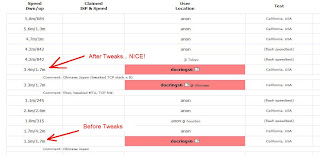
Japan Server Speed Test (Tokyo):
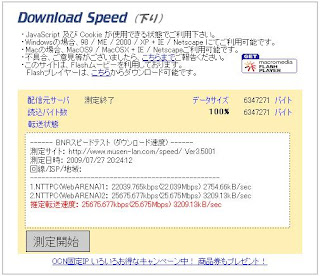
Geek out,
Matt
keywords: tweak internet connection okinawa japan international TCP/IP MTU
Testing to USA servers was about 1.5MB/s down & 1.7MB/s up (BTW, this is the fasted upload speeds I've ever seen... posting pics and videos are incredibly fast, about 5-8x faster than what I had in the USA).
YouTube videos were stuttering quite a bit, even on low-res. YouTube has recently been rumored to 'throttle back' download speeds to overseas IP addresses. Fortunately, HULU SD were good, and the HD videos stuttered occasionally for buffering.
So, I did some "tweaking" of my TCP/IP stack and DNS. All diagnostic tools were from www.dslreports.com
Here's my tweaks:
MTU of 1454 (I have a PPPoE connection, and did the testing to make sure this was the max before packet errors surfaced, using MTUTEST.EXE)
TCP Receive Window: 260176
Windows scaling YES
Time Stamping NO
Selective Acks YES
Path MTU Discovery YES
Black Hole Detection NO
Max. Duplicate ACKs 2
TTL 64
(Testing and tweaking with DRTCP021.exe)
Increased max connection to 10 with M$ FixIt and/or Tweak-XP Pro IV
Then I opened up the router programming page, and made the DNS default to the OpenDNS servers: 208.67.222.222 & 208.67.220.220
Now YouTube videos don't stutter any longer, and dslreport download speeds from USA servers have increased by double to 3.3MB/s down & 1.7 MB/s up.

Japan Server Speed Test (Tokyo):

Geek out,
Matt
keywords: tweak internet connection okinawa japan international TCP/IP MTU
Monday, July 27, 2009
Things I love about Japan
Fast fiberoptic internet speeds, and lightning quick to content in Japan:


Things are about "normal" cable speeds when watching YouTube videos, say, back in the United States.. but it does have to go 7000 miles! :)


Things are about "normal" cable speeds when watching YouTube videos, say, back in the United States.. but it does have to go 7000 miles! :)
Things I don't like about Japan
Streaming videos from the USA are blocked:

All the major websites think they're SOOO smart and give me the Japanese version of their website:

Kanji...those little symbols that you can't even sound out... what's it all mean? This is the air conditioning remote control... I feel like a 99-year-old grandma trying to run a VCR... Argh!!!


Kanji...those little symbols that you can't even sound out... what's it all mean? This is the air conditioning remote control... I feel like a 99-year-old grandma trying to run a VCR... Argh!!!

Saturday, July 25, 2009
Augmented Reality programs for iPhone
Overlay of personal Identification (video)
Overlay of stores, views, restaurants (video)
Starting to look a bit more like the 21st century we all were thinking about back in the 1980's....( the iPhone as Star Trek Tricorder, really...)
"Augmented Reality"...you'd better figure out quick what it is, and how it will change how you interact with EVERYTHING: travel, entertainment, shopping, gaming, business...
Geek out,
Matt
Overlay of stores, views, restaurants (video)
Starting to look a bit more like the 21st century we all were thinking about back in the 1980's....( the iPhone as Star Trek Tricorder, really...)
"Augmented Reality"...you'd better figure out quick what it is, and how it will change how you interact with EVERYTHING: travel, entertainment, shopping, gaming, business...
Geek out,
Matt
Cars in Japan we need in America
With rising emphasis on fuel economy, and new fuel efficiency standards from the government, why isn't America allowing more Japanese car models into America? During my stay on Okinawa, Japan, I've seen dozens of great little cars that would make great college cars, commuter cars, and small family cars.
There are a lot of great Japanese models from familiar companies that are sold worldwide, but not in America. Take a look and see what a great selection of neat little, economical cars they sell here. Most get 35+ MPG.
Toyota IQ

Suzuki Splash

Suzuki Alto

Subaru R1

Subaru R2

Nissan Micra Convertible

Mitsubishi i

Mazda Demio

Honda Life

Daihatsu Move

Daihatsu Move Latte

Daihatsu Mira

Daihatsu Mira Gino

Daihatsu Mira Custom

There are a lot of great Japanese models from familiar companies that are sold worldwide, but not in America. Take a look and see what a great selection of neat little, economical cars they sell here. Most get 35+ MPG.
Toyota IQ

Suzuki Splash

Suzuki Alto

Subaru R1

Subaru R2

Nissan Micra Convertible

Mitsubishi i

Mazda Demio

Honda Life

Daihatsu Move

Daihatsu Move Latte

Daihatsu Mira

Daihatsu Mira Gino

Daihatsu Mira Custom

Friday, July 24, 2009
Can't google figure out I want my login page in ENGLISH???
Okay, I get that I've moved to Japan. I get that google's servers are so smart, and they know my IP address is somewhere on Okinawa, Japan. But heaven help that it doesn't know that for the past three years I've logged on using English, and that would be a nice thing to continue doing, thank you very much.
Look at the screen. Could you even guess which Kanji symbols to actually click? Fortunately, I tried to click-by-memory, and after a few bad attempts, got it to look like the same graphical layout I was used to.
Sheesh! Smart is getting it right, stupid is assuming 100% of everyone on Okinawa reads Kanji symbols.
And everytime I do a google.com search, it assumes I want google.co.jp ... WRONG AGAIN GOOGLE. If I gosh-darn type "www.google.com" into the box, I gosh darn want google.com, not google.co.jp!!!! Give me a break!!!!
The only way is to go to igoogle.com, or hope you can read Kanji symbols again to set your preference for google for English only pages, but still everything gets messed up if you delete cookies.
Google... you need to get even smarter!


Look at the screen. Could you even guess which Kanji symbols to actually click? Fortunately, I tried to click-by-memory, and after a few bad attempts, got it to look like the same graphical layout I was used to.
Sheesh! Smart is getting it right, stupid is assuming 100% of everyone on Okinawa reads Kanji symbols.
And everytime I do a google.com search, it assumes I want google.co.jp ... WRONG AGAIN GOOGLE. If I gosh-darn type "www.google.com" into the box, I gosh darn want google.com, not google.co.jp!!!! Give me a break!!!!
The only way is to go to igoogle.com, or hope you can read Kanji symbols again to set your preference for google for English only pages, but still everything gets messed up if you delete cookies.
Google... you need to get even smarter!


Wednesday, May 13, 2009
Sunday, April 5, 2009
Kill-a-watt meter
I installed a Kill-o-watt meter in my home theater probably a year or more ago, and just now read the meter while pulling all the gear out for our move.
The readings were:
1094 hours time
71.03 kwh total used.
That doesn't seem to compute for the year I had it in, but more than likely it resets whenever the power fails, which happens from time to time down here in Florida.
So, in the past 1094 hours (or 45 days) I used about $7.00 of electricity, or about $5 a month for a 61" LED RPTV Samsung (HLT model), PS3, Xbox 360, Harmon-Kardon HK635 amplifier and a monster power conditioner. Not bad price for the electricity, really, and I would have guessed higher. But it is only used really for movies, and not used as frequently as the family room plasma which is powered on more frequently.
Geek-out,
Matt
The readings were:
1094 hours time
71.03 kwh total used.
That doesn't seem to compute for the year I had it in, but more than likely it resets whenever the power fails, which happens from time to time down here in Florida.
So, in the past 1094 hours (or 45 days) I used about $7.00 of electricity, or about $5 a month for a 61" LED RPTV Samsung (HLT model), PS3, Xbox 360, Harmon-Kardon HK635 amplifier and a monster power conditioner. Not bad price for the electricity, really, and I would have guessed higher. But it is only used really for movies, and not used as frequently as the family room plasma which is powered on more frequently.
Geek-out,
Matt
Wednesday, March 18, 2009
Okay, we have a stainless steel Dacor ventilation hood, and of course, they chose a halogen light bulb that is not carried by anyone on the planet!
The Dacor hoods also require this specialized "suction cup" device to grab the bulb and unscrew it (there is no way to get your fingers around the recessed bulb).
So go to Wal-Mart and buy a pack of cheap suction cups, plop one on the burnt out bulb face, and use a pair of pliers to unscrew the lightbulb.
Now, REMOVE THE TRIM RING to make the opening a little bit bigger and allow a standard halogen bulb from Lowe's to fit in there. I like the GE Halogen 60 Flood, #47578, for about $7.00. Fits like a charm without the trim ring. Seriously, no one will ever miss the trim ring as it is way up under the hood.
Oh, and that suction cup removal tool is supposed to come with every Dacor hood, but I'm sure every suction cup packaged was thrown away by the installer 'dude' along with all the packing materials and the box.
But, of course, Dacor would be happy to sell one to you on their website for $1.75... AND $12.00 shipping!!! Seriously, how stupid is that???!!!!
Fortunately, you got know how and my DIY guide to get you by the corporate greed and engineering stupidity that is at Dacor.
Geek out,
Doc


The Dacor hoods also require this specialized "suction cup" device to grab the bulb and unscrew it (there is no way to get your fingers around the recessed bulb).
So go to Wal-Mart and buy a pack of cheap suction cups, plop one on the burnt out bulb face, and use a pair of pliers to unscrew the lightbulb.
Now, REMOVE THE TRIM RING to make the opening a little bit bigger and allow a standard halogen bulb from Lowe's to fit in there. I like the GE Halogen 60 Flood, #47578, for about $7.00. Fits like a charm without the trim ring. Seriously, no one will ever miss the trim ring as it is way up under the hood.
Oh, and that suction cup removal tool is supposed to come with every Dacor hood, but I'm sure every suction cup packaged was thrown away by the installer 'dude' along with all the packing materials and the box.
But, of course, Dacor would be happy to sell one to you on their website for $1.75... AND $12.00 shipping!!! Seriously, how stupid is that???!!!!
Fortunately, you got know how and my DIY guide to get you by the corporate greed and engineering stupidity that is at Dacor.
Geek out,
Doc


Monday, March 2, 2009
Saturday, January 31, 2009
Is Google Search in Firefox under attack?
Today, all my google searches in Firefox, no matter the subject, have the "This Site May Harm Your Computer" tag, and are unreachable. Even the hotlink to continue shows a "server error" from google. All other search engines are working fine, e.g. Yahoo, etc., and Google search in IE Explorer are fine....
In fact, if I switch Firefox to IE mode (using IE Tab add-on), the search works fine...
What the heck????
Anyone else?
Edit: 10:11AM: Looks like I wasn't the only one.
Digg Stories
Google must have had some BIG problems today, but hopefully, this will get fixed soon.

In fact, if I switch Firefox to IE mode (using IE Tab add-on), the search works fine...
What the heck????
Anyone else?
Edit: 10:11AM: Looks like I wasn't the only one.
Digg Stories
Google must have had some BIG problems today, but hopefully, this will get fixed soon.

Monday, January 12, 2009
Yahoo Pop Email Settings
I can't recall how often I have to set up Yahoo! Email accounts for Outlook Express. I'm just posting the link to make it easy to find for me and everyone else.
/Geek out,
Matt
Tuesday, January 6, 2009
XM Radio customer DIS-service

Well, tonight is "Night Two" of trying to disconnect one of my four XM Radios. The radio died, and now it has been a LOOOOONNNNNNGGGGG time on hold with the customer service reprentatives (yes, plural) to just have one radio turned off.
You can do just about anything on the XM Radio website... except disconnect a radio. No doubt this is just a technological "road block" to try and discourage unhappy customers from being able to cancel their service on a whim ( reminiscent of the now defunct AOL ).
You get through to the first international operator (obviously India) after a hold of about 5 minutes. After an aggravating confirmation of everything but your firstborn, and a pitch for upgrading to Sirius services ("No, Howard Stern is too filthy for me, thank you"), you finally get around to telling them your business of wanting to disconnect just one radio. Well... that's handled by ANOTHER operator in ANOTHER department. When I queried why they must use TWO people to do this, it was because "we're too busy to handle that". What???
And guess, what? I've been able to compose this entire blog post while on hold AGAIN for now
I also have to suffer through Oprah's best friend begging me in a recorded message not to hang up... also a Nascar driver pitching his show and also asking me "this is worth the wait"... NOT!
I want my life back!
Just aggravation, pure and simple. They could easily add a radio button for disconnecting a particular radio (without "canceling" the total subscription). This is just customer harassment and roadblocking, pure and simple.
I love my XM Radio, but the customer service for this particular requirement is a DIS-service. XM... FIX IT!
/Doc
Wednesday, December 31, 2008
Windows Driver Backup
Here's a great website and small batch file program to backup your Windows drivers for a re-install of Windows. Haven't tried it quite yet, but am blogging this for definite future use!
Thursday, November 13, 2008
Free phone, free video phone = skype
I purchased a Logitech camera a few months back pretty cheap after rebate, and now had an opportunity to use it with Skype. The allure of free skype-to-skype video phone calls is alluring, as well as $29.50 a year for unlimited USA skype-to-any landline phone calls. Not bad.
The great thing is that for callling Japan, it is only $9.95 a month, UNLIMITED Skype-to-Japan landline. Wow! How's that for keeping in touch???!!!!
Free download, and just need a cheap webcam: I recommend the Microsoft VX-1000 for $22, a bit more if you have to buy and ship. No need to go too fancy for megapixels, as you want fast streaming/compact video.
Gmail also just announced free video phone/messaging service, too. I will try that later, but I like Skype for the computer-to-landline paid service (but extremely cheap!!!).
Just note that if you are considering ditching your AT&T landline, then you will need a cell phone for 9-1-1 service. Computer phone companies can't reliably give that service, especially if your electricity is out, or your computer just crashed. But for most of us with cell phones, it may be time to ditch the wired phone to the wall, and just go cell/Skype combo.
Geek out,
Matt
The great thing is that for callling Japan, it is only $9.95 a month, UNLIMITED Skype-to-Japan landline. Wow! How's that for keeping in touch???!!!!
Free download, and just need a cheap webcam: I recommend the Microsoft VX-1000 for $22, a bit more if you have to buy and ship. No need to go too fancy for megapixels, as you want fast streaming/compact video.
Gmail also just announced free video phone/messaging service, too. I will try that later, but I like Skype for the computer-to-landline paid service (but extremely cheap!!!).
Just note that if you are considering ditching your AT&T landline, then you will need a cell phone for 9-1-1 service. Computer phone companies can't reliably give that service, especially if your electricity is out, or your computer just crashed. But for most of us with cell phones, it may be time to ditch the wired phone to the wall, and just go cell/Skype combo.
Geek out,
Matt
Saturday, November 1, 2008
Sony Vaio PCV-W600G upgrade
The old 160GB hard drive was getting pretty full, especially with the purchase a year ago of an 8 megapixel camera with video, so Newegg supplied a 500GB hard drive for a pretty good price.
I also had a spare stick of 512MB DDR RAM, so wanted to put that in, too, to bump up the RAM to 768MB (from 256x2, or base 512MB).
Things were pretty straight forward, and both a hard drive change and memory upgrade require no more than a philips head screwdriver.

Step one is to look behind the screen and see a small button, which you depress and then slide the cover to the right an inch, and then lift out (as above).
 Step two involves removing the one small screw over the small plate covering the RAM chips. Then slide the small metal panel and remove. Unsnap the memory release tabs, and insert new RAM (the Vaio motherboard can only support 2 sticks of 512MB DDR-333 SDRAM (desktop RAM, not laptop style). This is also known as PC-2700 as well (speed rating ~ 8 x 333MHz)
Now, time for a Hard Drive upgrade. You better have copied over EVERYTHING you will need to an external USB drive. Think about everything in "My Documents" (incl music, pictures, downloads, etc.). One thing easy to forget is Outlook Email and the Address Book, which is not routinely kept in My Documents, so you will need to export or backup Outlook or Outlook Express email & address book. Do a GOOGLE search on that topic...there are programs out there to do that too. Also think about stuff that is saved under the "Program Files" directory: tax returns, etc.
Consider if you have the restoration disks for your computer, or the ability to re-install Windows (CD + registration key, on the side of the computer). Also consider if there is some program you are using regularly, that you might not have the install disk... this is easy to overlook, and can be a deal-stopper.
The Vaio PCV-W600G originally came with Windows Home version, but I upgraded to WinXP PRO, which can be bought pretty cheap these days.
You're just better off copying the whole darn hard-drive to the USB hard drive (I like to have a backup hard-drive at least double the size of the computer it's backing up...)
Alright, to get the old hard-drive out, remove all the screws you can see holding on the back plastic panel. You will also need to remove two thin rubber "feet" off the bottom to remove two additional screws. Then using a thin screwdriver pop off the plastic cover.
 Then, you will see the metal box holding the hard-drive on the back of the base unit. Remove those screws to the metal "box", and then remove the hard-drive cables for data and power, remove the mounting screws holding the hard-drive to the box, and slide it out.
 Remove the old hard-drive.

Re-install the new hard-drive, and reverse the above to reattach everything to normal. Make sure you get your can of compressed air and blow out the years of accumulated dust, both back here and on any other air intake ports.
Voila! You've upgraded the hard-drive!
If you need to get into the BIOS for any reason, hit F2 a few times immediately after powering up the computer.
You will need your Restoration disk or WinXP install disk in the CD-ROM for the computer to boot and begin the process.
Once Windows is back up and running, let Windows go through the whole "update" process, which can take multiple downloads and re-boots, including SP3, which is humungous. Do *all* updates before installing ANYTHING else. When there are no more updates (go to updates.windows.com to make sure), then save a Restore Point and name it "fresh install with updates" or some-such.
Now copy over all your My Documents folders (pics, music) from the external hard-drive. Reinstall your favorite Programs, and restore your Outlook Express emails (or Microsoft Office to get Outlook going).
Some great programs I always put on a fresh install:
All of these are free shareware, except for those marked with a *
Windows Defender antispyware
Avast antivirus
Firefox 3
Winrar
Outlook Backup program
Picassa3
Framework .Net 3.0 with SP1 (required by many programs)
TweakXP Pro
Winamp 2.95 (fast and fluff free)
Yahoo Widgets
Cobian Backup
Roboform *
Microsoft Mesh (for networking my computers worldwide)
Powertoys
Tweak UI
MS Office * (also get Office Updates from microsoft.com)
CD Burner XP Pro
Audiograbber
Foxit PDF (see PDF files without the large Adobe download)
Printer Drivers
Image Resizer (microsoft free download)
Here's my favorite Firefox add-ons, too, which need to be re-installed:
forecastfox
IE Tab
AdBlock+
AI Roboform
Del.ico.us
Download Statusbar
Tab Effect
Consider moving your email cache and address book to a folder in "My Documents" called "My Email"... that way it gets backed-up automatically when you make a weekly backup of "My Documents" to an external hard-drive (I use Cobian Backup, which is free and reliable).
Have fun,
Geek out,
Matt
I also had a spare stick of 512MB DDR RAM, so wanted to put that in, too, to bump up the RAM to 768MB (from 256x2, or base 512MB).
Things were pretty straight forward, and both a hard drive change and memory upgrade require no more than a philips head screwdriver.

Step one is to look behind the screen and see a small button, which you depress and then slide the cover to the right an inch, and then lift out (as above).
 Step two involves removing the one small screw over the small plate covering the RAM chips. Then slide the small metal panel and remove. Unsnap the memory release tabs, and insert new RAM (the Vaio motherboard can only support 2 sticks of 512MB DDR-333 SDRAM (desktop RAM, not laptop style). This is also known as PC-2700 as well (speed rating ~ 8 x 333MHz)
Now, time for a Hard Drive upgrade. You better have copied over EVERYTHING you will need to an external USB drive. Think about everything in "My Documents" (incl music, pictures, downloads, etc.). One thing easy to forget is Outlook Email and the Address Book, which is not routinely kept in My Documents, so you will need to export or backup Outlook or Outlook Express email & address book. Do a GOOGLE search on that topic...there are programs out there to do that too. Also think about stuff that is saved under the "Program Files" directory: tax returns, etc.
Consider if you have the restoration disks for your computer, or the ability to re-install Windows (CD + registration key, on the side of the computer). Also consider if there is some program you are using regularly, that you might not have the install disk... this is easy to overlook, and can be a deal-stopper.
The Vaio PCV-W600G originally came with Windows Home version, but I upgraded to WinXP PRO, which can be bought pretty cheap these days.
You're just better off copying the whole darn hard-drive to the USB hard drive (I like to have a backup hard-drive at least double the size of the computer it's backing up...)
Alright, to get the old hard-drive out, remove all the screws you can see holding on the back plastic panel. You will also need to remove two thin rubber "feet" off the bottom to remove two additional screws. Then using a thin screwdriver pop off the plastic cover.
 Then, you will see the metal box holding the hard-drive on the back of the base unit. Remove those screws to the metal "box", and then remove the hard-drive cables for data and power, remove the mounting screws holding the hard-drive to the box, and slide it out.
 Remove the old hard-drive.
Re-install the new hard-drive, and reverse the above to reattach everything to normal. Make sure you get your can of compressed air and blow out the years of accumulated dust, both back here and on any other air intake ports.
Voila! You've upgraded the hard-drive!
If you need to get into the BIOS for any reason, hit F2 a few times immediately after powering up the computer.
You will need your Restoration disk or WinXP install disk in the CD-ROM for the computer to boot and begin the process.
Once Windows is back up and running, let Windows go through the whole "update" process, which can take multiple downloads and re-boots, including SP3, which is humungous. Do *all* updates before installing ANYTHING else. When there are no more updates (go to updates.windows.com to make sure), then save a Restore Point and name it "fresh install with updates" or some-such.
Now copy over all your My Documents folders (pics, music) from the external hard-drive. Reinstall your favorite Programs, and restore your Outlook Express emails (or Microsoft Office to get Outlook going).
Some great programs I always put on a fresh install:
All of these are free shareware, except for those marked with a *
Windows Defender antispyware
Avast antivirus
Firefox 3
Winrar
Outlook Backup program
Picassa3
Framework .Net 3.0 with SP1 (required by many programs)
TweakXP Pro
Winamp 2.95 (fast and fluff free)
Yahoo Widgets
Cobian Backup
Roboform *
Microsoft Mesh (for networking my computers worldwide)
Powertoys
Tweak UI
MS Office * (also get Office Updates from microsoft.com)
CD Burner XP Pro
Audiograbber
Foxit PDF (see PDF files without the large Adobe download)
Printer Drivers
Image Resizer (microsoft free download)
Here's my favorite Firefox add-ons, too, which need to be re-installed:
forecastfox
IE Tab
AdBlock+
AI Roboform
Del.ico.us
Download Statusbar
Tab Effect
Consider moving your email cache and address book to a folder in "My Documents" called "My Email"... that way it gets backed-up automatically when you make a weekly backup of "My Documents" to an external hard-drive (I use Cobian Backup, which is free and reliable).
Have fun,
Geek out,
Matt
Subscribe to:
Posts (Atom)